
If you need to collect sensitive data from customers, like social security numbers or credit card information, using a web form can be an attractive option. Using web forms, however, can present a serious exposure to you and your customers if you do not take adequate steps to secure the information from unauthorized access. This blog post will explain how to use the SendSafely Dropzone API to build a web form that uses end-to-end encryption for protecting submitted data.
What’s wrong with popular web form solutions? Plenty!
Web forms make it extremely easy for users to provide information to you using any web browser. The problem is that most common options for building a web form have significant security pitfalls. This is especially true if you are collecting identity verification information, like scanned passports or other items that are useful targets for identity theft (date of birth, drivers license number, etc).
Here are a few common options that you need to use with caution:
-
Custom web forms platform like Google Forms, Formsite and Wufoo. These platforms provide hosted web forms that are are simple to set up and make it easy to access stored information, however the form provider has full access to all of this information too. What if the forms provider gets breached?
-
Forms “plug-in” for your existing website (Wordpress, Drupal and Joomla, etc). These plugins typically let you store the information directly in your own database or send the information to you via email. The problem here is that your website database is not likely protected from sophisticated hackers that want this information. And we all know that sending the information via email is a bad idea, right?
-
Popular cloud hosting platform like SquareSpace, Weebly and Wix. Again, these platforms are easy to set up, but do not provide you with the necessary safeguards to ensure that only you can access the information you are collecting.
The SendSafely Dropzone API
The SendSafely Dropzone API can be used to add file and field level encryption to any existing web form. Recently, we’ve made some enhancements to the API to expand its capabilities and allow you embed a completely custom form on any website using static HTML and JavaScript.
-
The Dropzone now allows you to add encrypted text to items you submit. The format and structure of the text is completely up to you and is not limited in size or length, so you can embed as many name/value pairs as you wish and store them in whatever format you choose.
-
SendSafely’s Dropzone notification endpoint now supports cross-domain requests, so once the form data is submitted you can connect the form to any notification mechanism you choose or use our built-in email notification option.
Our notification endpoint is designed to provide your embedded form with the same callback URLs that our Hosted Dropzone uses. That means you can connect your embedded web form to our Zapier App or one of our Dropzone Connectors, so that notifications can be posted to another SAAS platform like Slack, Salesforce, or Zendesk.
How it Works
The diagram below shows the high-level data flow associated with an encrypted web form.You direct your customer to a web form that allows them to provide any number of text inputs and also attach files. The web form can be hosted on any website, and uses only static HTML and JavaScript.
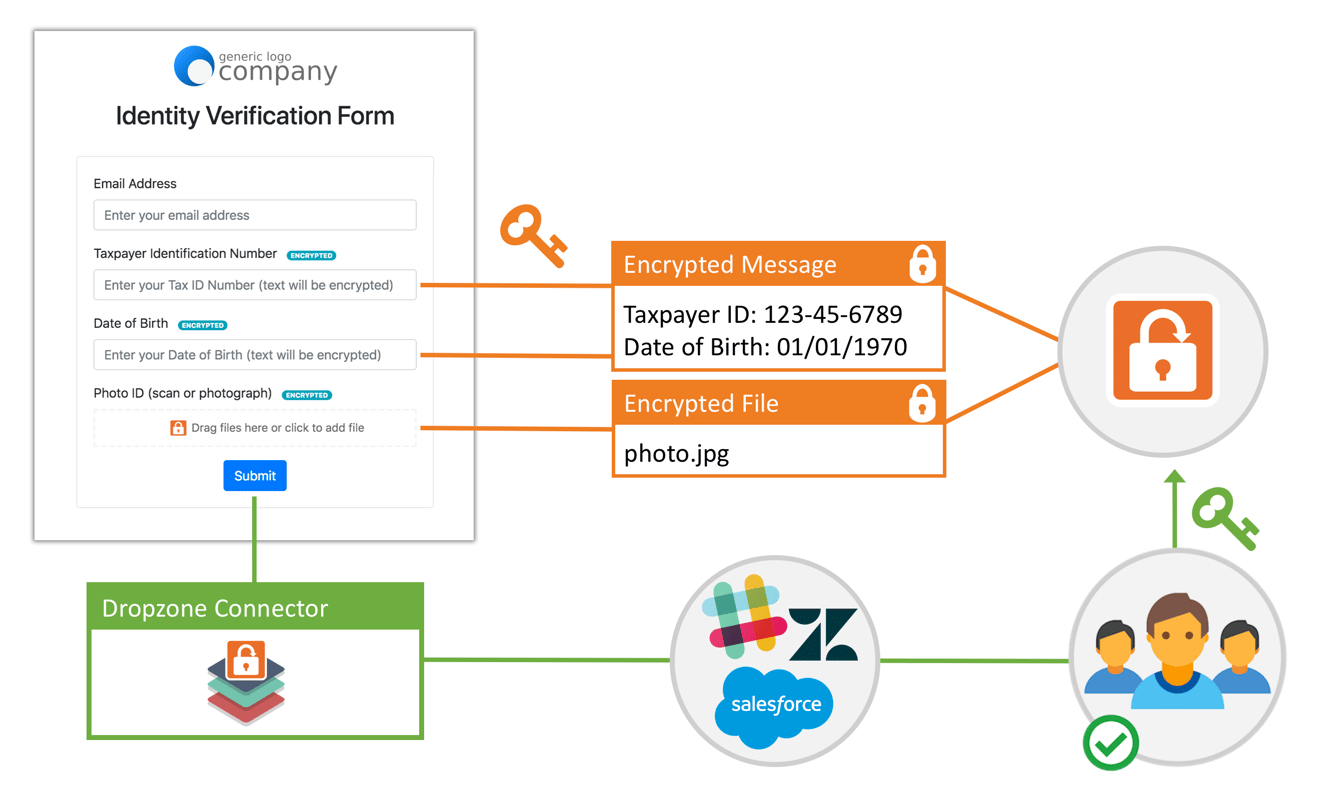
When the user submits the form, the text fields are bundled together and encrypted into a SendSafely secure message using a unique form key, which is then encrypted using each of the Dropzone recipient public keys. Any attached files are also encrypted using the same keys and submitted to SendSafely.
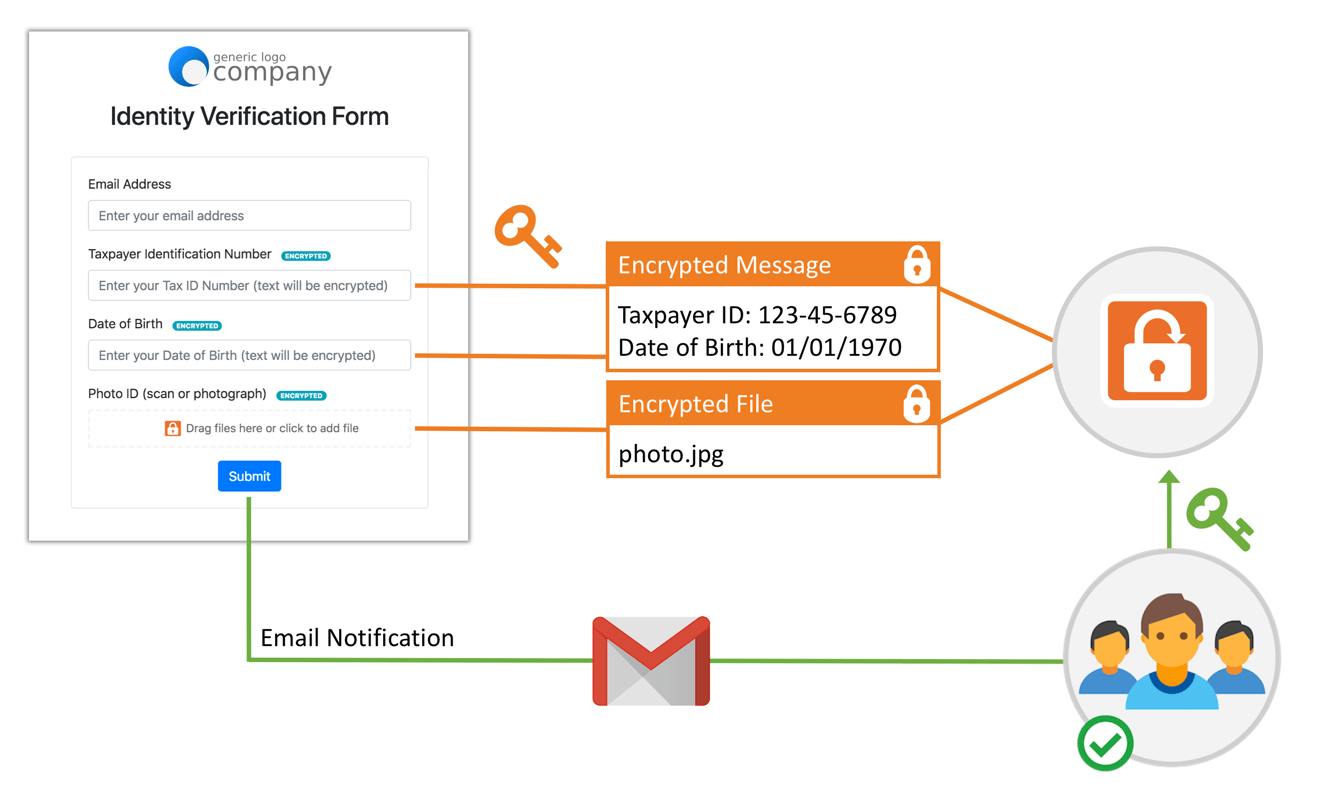
After the submission is complete, an email notification it sent to the SendSafely Dropzone recipients letting them know of the new form submission. Each recipient can log into SendSafely, and is able to decrypt and view the information using their private keys.
For more advanced workflows, the Dropzone also supports using a Dropzone Connector to post notifications to a third party platform, like Zendesk or Salesforce, or use a different method for posting notifications, like Slack through our Zapier app.
Interested in implementing your own encrypted web form? Check out our Help Center Article that walks through the technical details of how to get one running on your own website. You can also check out the live CodePen Examples that we’ve published for you to use as a quick-start template.
Not a developer? Not a problem! Our Hosted Dropzone is a turn-key form that is pre-installed and ready to use on every SendSafely enterprise portal. The Hosted Dropzone is perfect for technical users that want a fast and easy way to start collecting sensitive information from customers. If you are a current SendSafely customer and would like help setting up a custom web form, send an email to support@sendsafely.com.
SendSafely: The Easy to Use End-to-End Encryption Platform.
If you are looking for a secure way to collect sensitive information from customer, our platform might be right for you. Contact us today to request a demo and free trial subscription.
Request a Demo


