
Managing permissions across a growing user base can be challenging, especially when different teams require different levels of access to sensitive features. That’s why we’re excited to introduce Security Groups, a powerful new feature that gives SendSafely administrators granular control over user permissions and feature access.
What are Security Groups?
Security Groups allow you to create and manage subsets of users who are authorized to access specific SendSafely features. Whether you’re looking to control access to Dropzones, API keys, Workspaces, or trusted device capabilities, Security Groups make it simple to enforce access policies at scale.
As an example, let’s say you want only a few approved service accounts to own Dropzones. With Security Groups, you can:
- Disable Dropzones globally by default
- Create a “ Dropzone Owner” security group
- Add the approved service accounts to that group
Once the group is enabled, only those users would be able to create and manage Dropzones —everyone else is automatically restricted.
How it Works
Security Groups are available on Business and Enterprise Plans and are managed by admins via the Enterprise Console.
- Custom Configuration: Groups (names and permissions) are set up per your organization’s specifications by the SendSafely support team. One group can have multiple permissions.
- Admin-Controlled Membership : Once configured, any admin in your portal can add or remove registered users from groups. Up to 50 users at a time can be added by using a comma-separated list.
- Multi-Group Support : A single user can belong to multiple security groups, making role-based access easy to model.
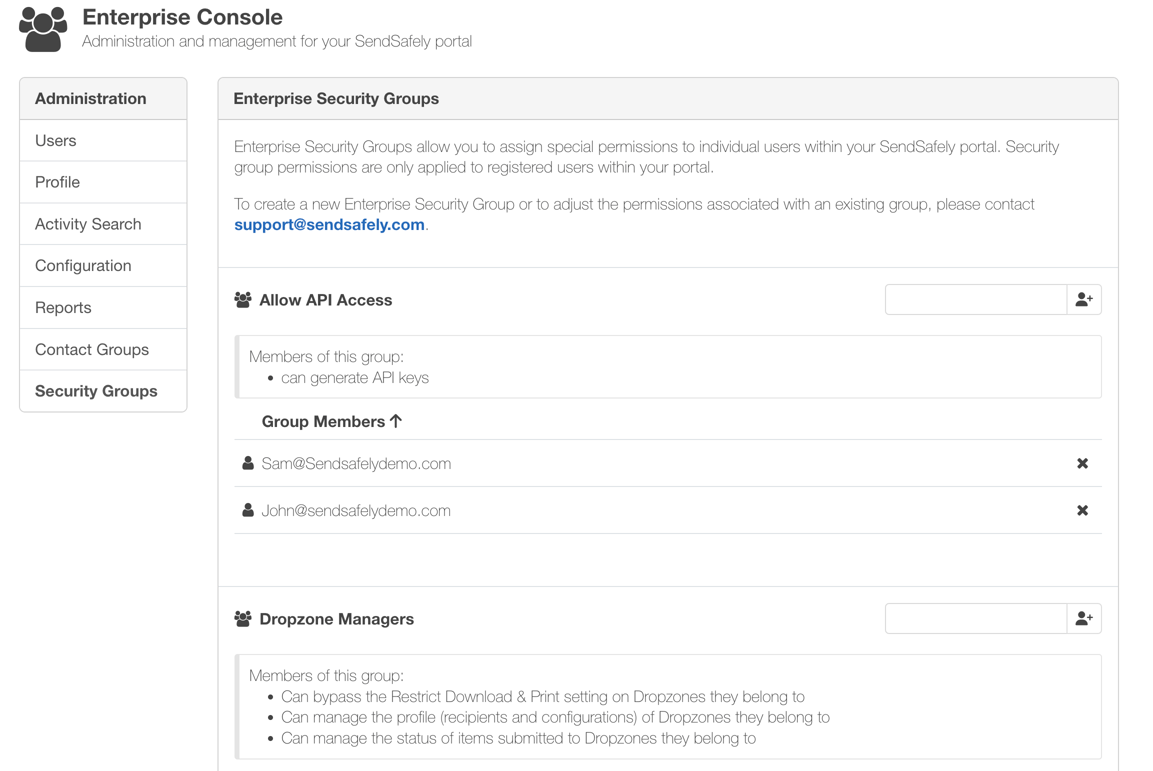
Here are a few real-world examples of how you can use Security Groups:
- Workspaces : Limit who can create and own Workspaces, while still allowing others to collaborate. Great for maintaining centralized control over shared environments.
- Dropzone Ownership : Restrict who can enable and manage Dropzones—ideal for organizations that require tight oversight over external file intake.
- Dropzone Manager : Give a subset of users the ability to manage Dropzone settings, recipient lists, and package-level permissions.
- API Keys: Restrict who can generate API keys—perfect for isolating API access to technical or administrative users.
- Trusted Device Keys: Control who can add trust devices to their profile, a useful safeguard when you only want users accessing packages from an integrated third party platform like Salesforce, Zendesk, or Intercom.
Each Security Group can support multiple permissions, allowing you to model real-world access patterns. For example, you can create a group called “BPO Agents”** and block access to API Keys and Trusted Device Keys, effectively limiting their access methods. This scenario is useful for call center or outsourced environments where exposure must be minimized.
As new feature-level permissions are introduced, Security Groups will continue to expand, giving you even more ways to fine-tune your organization’s use of SendSafely.
Ready to Enable Security Groups?
If you’re a SendSafely Enterprise customer and would like to enable Security Groups, simply contact our team at support@sendsafely.com. Once configured, your admins will have full control to manage group membership directly from the portal or via our API.
Security Groups give your team the tools to implement role-based access control and minimize risk. We’re excited to see how you use them to strengthen your data protection strategy. Let us know if you’d like help designing your group structure or aligning it with your compliance policies!
SendSafely: Integrated File Transfer for the Apps you Love
If you are looking for a secure way to send or receive files with anyone, or simply need a better way to transfer large files, our platform might be right for you.
Request a Demo


