Describe the form you need. The AI assistant builds it, brands it, and publishes it on your SendSafely portal, with every submission end-to-end encrypted. No developer queue. Now in beta.
Quick to set up. But the form provider can read every submission, and attachments usually end up in someone's inbox. A breach of that vendor exposes everything you collected.
Every submission is protected. But someone has to write the HTML, validation, and styling around the Dropzone widget, and every change goes back into the developer queue.
The AI Custom Form Builder gives you the speed of the first and the security of the second.
Watch a prompt become a live, encrypted intake form.
The whole flow runs inside your SendSafely portal. No developer, no hosting, no separate form vendor.
Start from a template or a blank page and list your fields in plain English. The assistant confirms which fields are required and how each one is validated.
“Create a customer onboarding form with name, email, account number, supporting documents, and a dropdown for issue type.”Open a live preview and send a test submission. Then keep chatting to add fields, change labels, tighten validation, or restyle the page.
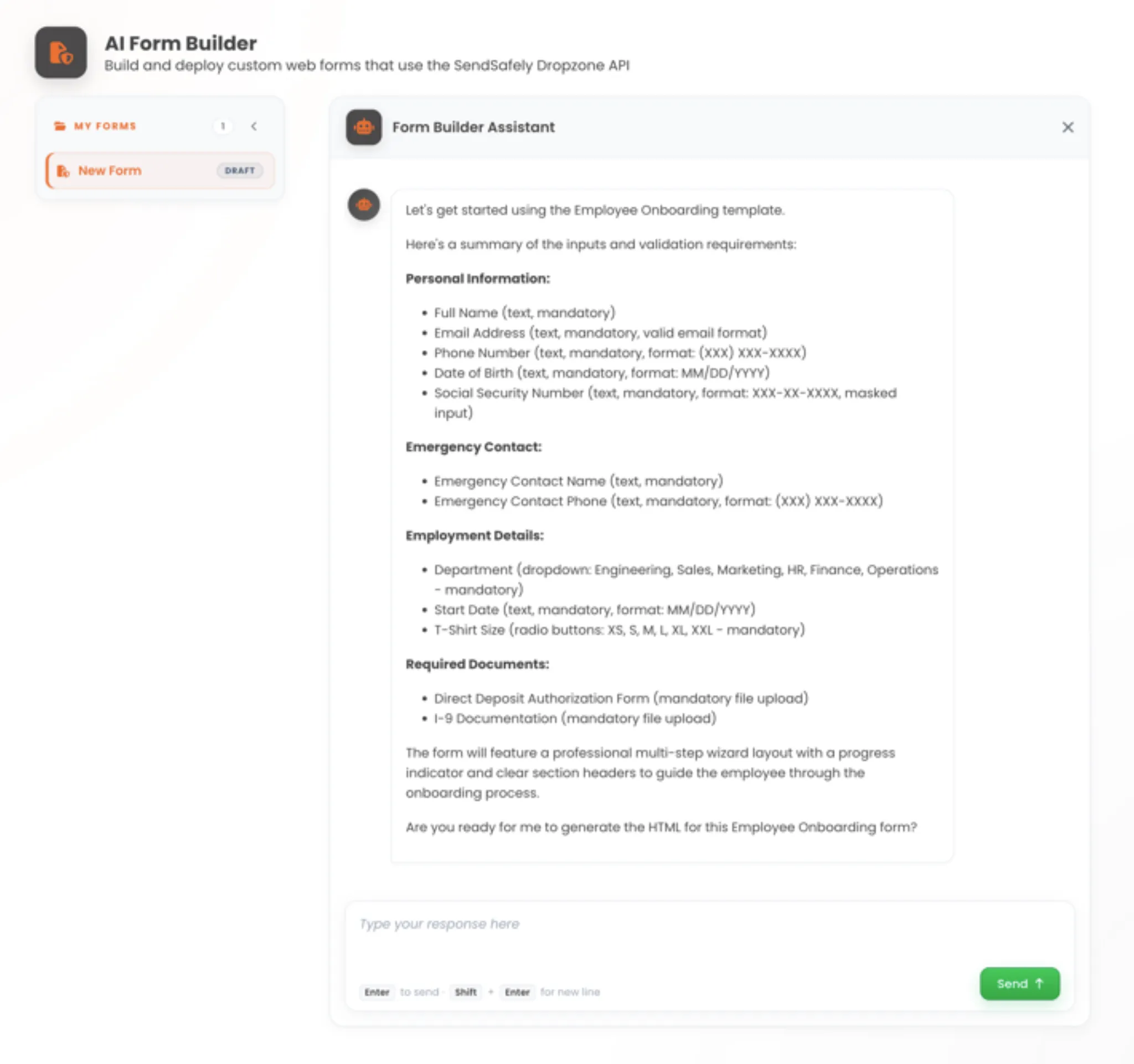
The assistant confirms fields and rules before it builds.
Save the form, give it a clean address like /forms/onboarding, and switch it from Draft to Live. Only Live forms are visible outside your team.
Add a case number to the end of the link, like /forms/helpdesk/INC-48211. It becomes the submission's label, and your Dropzone connectors use it to attach the files to the matching Zendesk or Salesforce record.
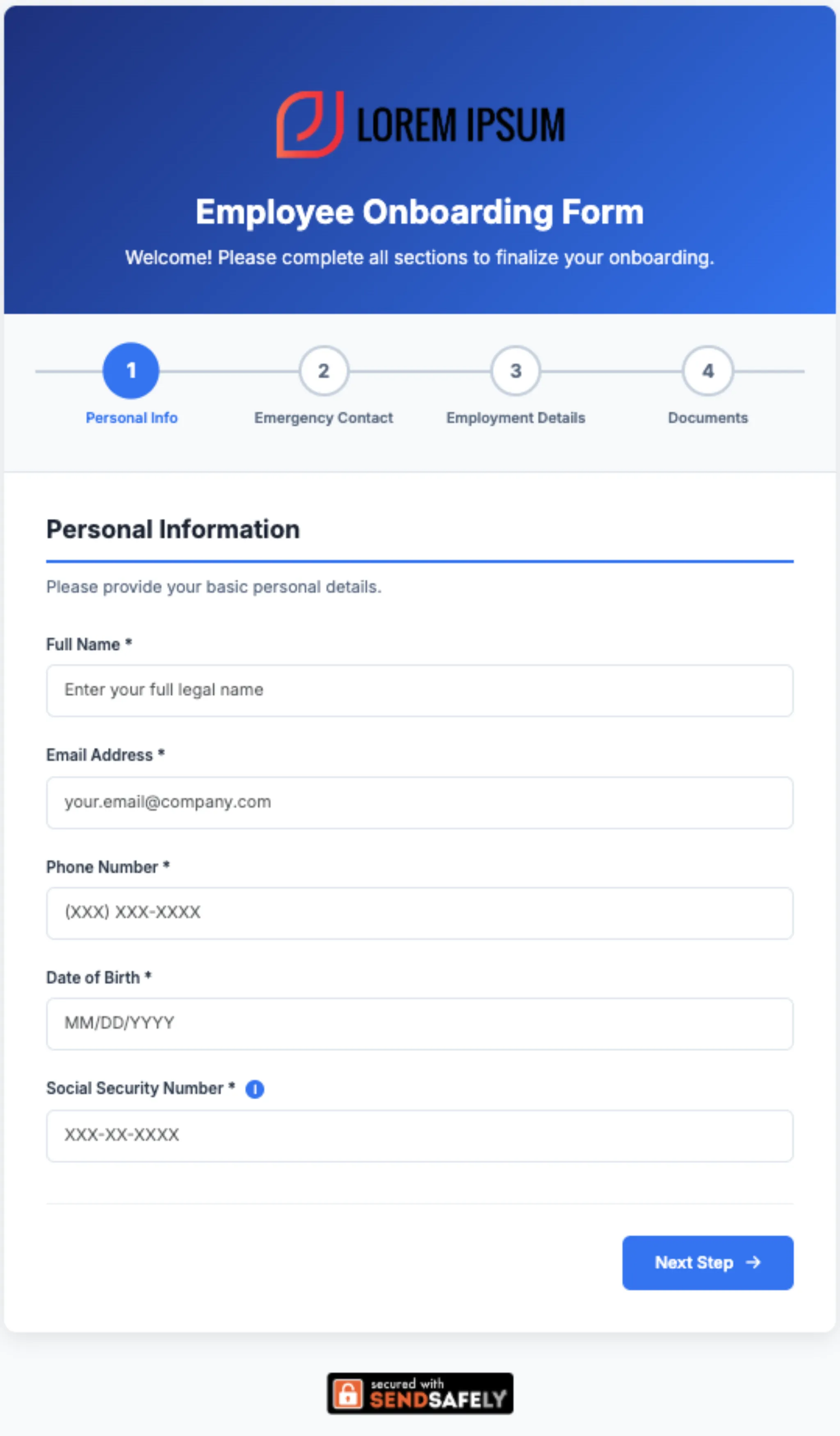
A published form, built from the Employee Onboarding template.
Submissions deliver through your Dropzone, so the controls your security team already set apply to every form automatically.
Anywhere a customer, employee, or partner hands you something you can't afford to leak.
ID images, proof of address, and account details in one encrypted submission, labeled with the customer's reference number.
Send a link that carries the ticket number. Files land on the right ticket without an agent touching them.
Start from the template. Collect Social Security numbers, I-9 documents, and direct deposit forms without email.
One branded page for contracts, evidence, and signed paperwork, with required fields and attachments.
Every field and file is encrypted in the submitter's browser using OpenPGP and delivered through your Dropzone. Only your recipients can decrypt it.
SendSafely is SOC 2 Type 2 audited annually and maintains the certifications regulated industries require.
The AI Custom Form Builder is included on the Team, Business, and Enterprise plans. It is currently in beta. Compare plans.
Yes. Every form is backed by your Dropzone, so the Dropzone must be turned on. Submissions go to your Dropzone recipients and follow your Dropzone's expiration, file-type, watermarking, and notification settings.
Yes. Add a reference to the end of the form URL, like /forms/helpdesk/INC-48211. That value becomes the package label, and Dropzone connectors that read the label can attach the submission to the matching Zendesk or Salesforce record.
Forms use Bootstrap, Font Awesome, and any Google Font. You can set your own logo, background image, colors, and layout, and the assistant writes custom CSS for anything beyond the defaults. External CSS frameworks such as Tailwind are not supported.
Open the form and choose Copy Form. The assistant loads the current design so you can describe your changes. Save the copy, move the URL over to it, and delete the original.
The assistant works from the chat only. It cannot open URLs, screenshots, or PDFs. To recreate an existing form, have another AI tool turn it into a detailed written prompt, then paste that prompt into the Form Builder.
See the AI Custom Form Builder build a form for your intake workflow. Included on Team, Business, and Enterprise plans.