Skip to content
New AI Custom Form BuilderDescribe the intake form. It ships branded and end-to-end encrypted.AI Custom Form Builder is here See it build
Home Features Admin controls

Admin controls that limit blast radius.

Give every team exactly the SendSafely access its job requires, and manage every portal you run from one login. Security Groups and Multi-Portal Administration, built into the Enterprise Console.

As SendSafely spreads, so does access.

Inside a portal

Everyone gets every feature

An outsourced support agent who only needs to receive customer documents can also send files out and generate API keys. Every unneeded permission widens what a compromised account can reach.

Across portals

A separate login for every portal

Subsidiaries, hosting regions, and sandbox environments each get their own portal, and each needs its own admin account. Partners managing customer portals juggle dozens.

Security Groups fix the first. Multi-Portal Administration fixes the second.

Security Groups: turn it off, then grant it back.

Disable a feature for everyone, then give it back to the few users who need it. A receive-only agent stays receive-only in Zendesk, Salesforce, Outlook, Gmail, and the web portal.

Business and Enterprise plans

Built to your spec

SendSafely support creates each group with the name and permissions you choose. One group can carry several permissions.

Managed by your admins

Add or remove members from the Enterprise Console or the API, up to 50 at a time. A user can belong to several groups.

Ready for access reviews

The Security Group Members report exports every group's membership as a CSV in one click.

Enterprise Console / Security Groups
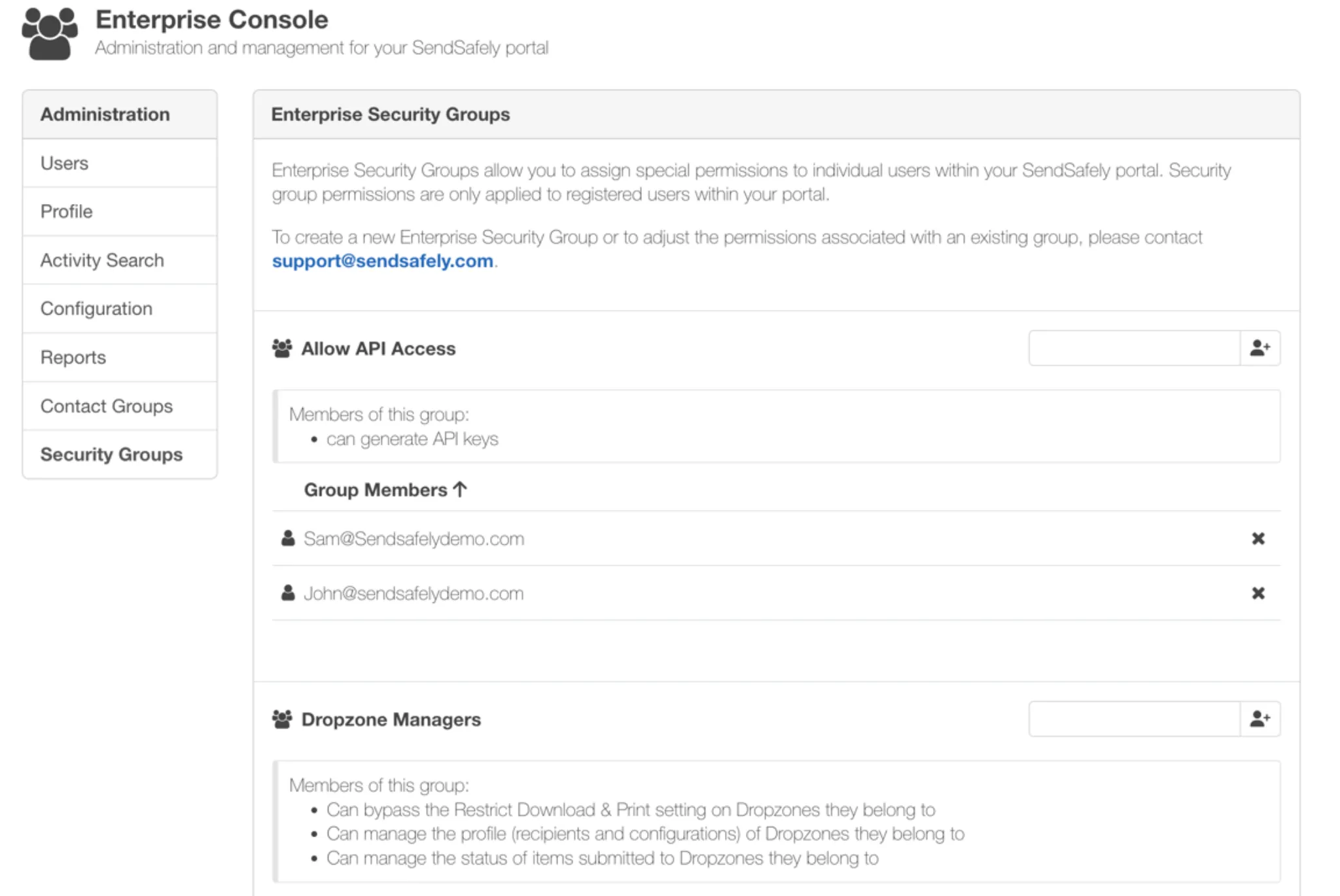
Security Groups in the SendSafely Enterprise Console, showing an Allow API Access group and a Dropzone Managers group with their members

Each group lists its permissions and members.
Ten permissions today, more as features ship.

Combine any of these in a group. New feature-level permissions are added to Security Groups as they launch.

Ownership and management

Workspace Ownership

Only designated accounts can create and own Workspaces. Everyone else can still collaborate.

Dropzone Ownership

Limit who can own a Dropzone, such as a few approved service accounts.

Dropzone Manager

Let a team manage Dropzone recipients, settings, and submitted items without full admin rights.

Personal Actions Workflows

Decide who can build personal Actions workflows, such as service accounts.

Access paths

Send Outbound

Only designated accounts can send files out. Everyone else is receive-only, across every integration.

API Keys

Only approved technical users can generate API keys.

Trusted Device Keys

Control who can add trusted devices, so others open packages only through a secure link or an integrated platform.

Policy exceptions

IP Restrictions exemption

Exempt specific users or service accounts from your portal-wide IP allow list.

Package Delete

When manual deletion is off for retention reasons, let a small group delete packages.

Workspace Expiration exemption

Let named users keep Workspaces that don't expire in a portal that enforces expiration.

Three setups teams use most.

SendSafely support can help you design a group structure that matches your compliance policies.

Receive-only BPO agents

Agents collect customer documents but can't send data out, generate API keys, or open packages outside the helpdesk.

Uses: Send Outbound, API Keys, Trusted Device Keys

Service-account Dropzones

Dropzones are off for everyone by default. A few service accounts own them, and a team lead manages settings without being an admin.

Uses: Dropzone Ownership, Dropzone Manager

Named policy exceptions

Enforce expiration and IP restrictions across the portal, then exempt only the accounts that run long-lived processes.

Uses: Workspace Expiration, IP Restrictions

Multi-Portal Administration: every portal, one login.

Built for organizations with portals for subsidiaries, hosting regions, or sandbox and production, and for partners who manage portals for their customers.

Enterprise plan

One dashboard

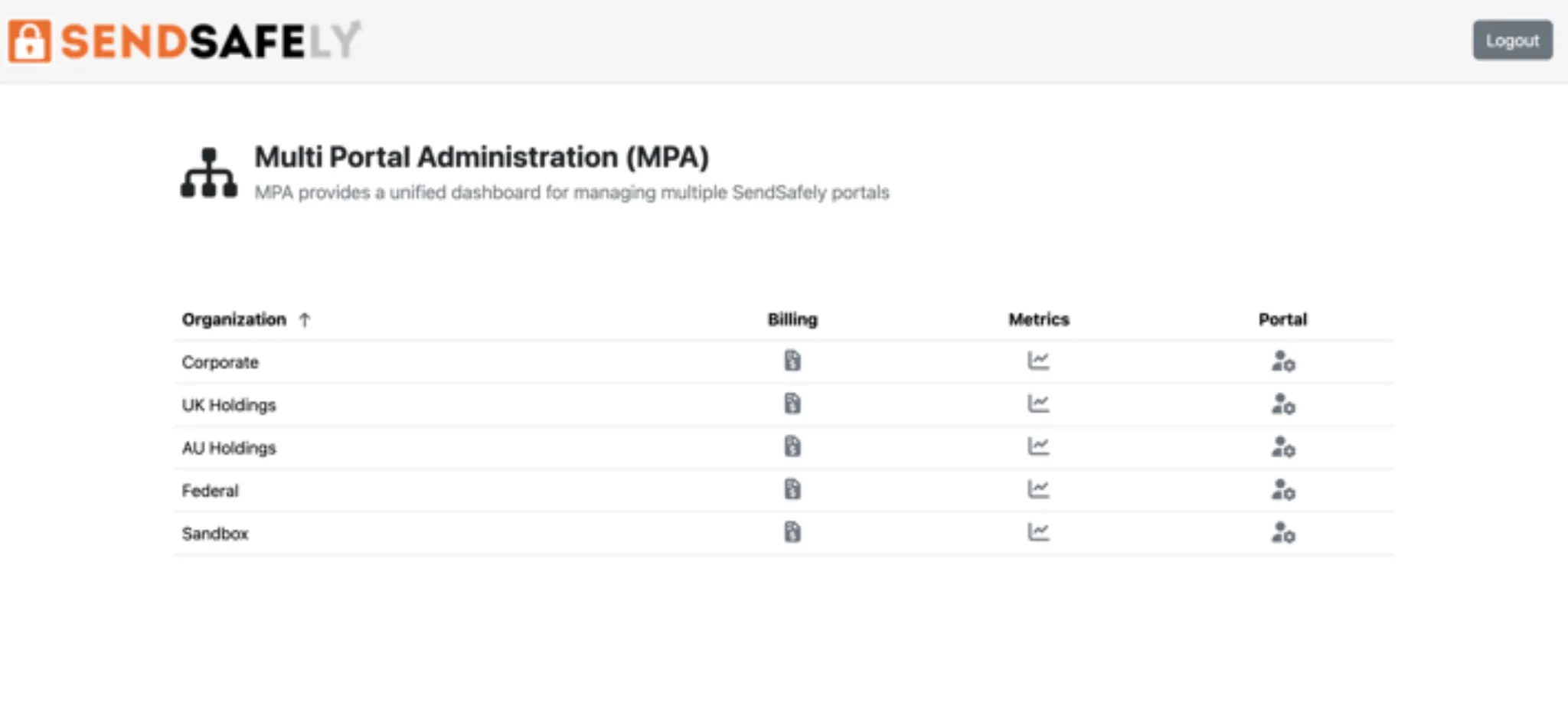
Every portal assigned to you, with its billing, usage metrics, and a one-click way in.

No standing admin accounts

Opening a portal grants temporary admin access to its Enterprise Console. Every action is logged in that portal's audit log.

Locked to your network and identity provider

An IP allow list is required. Sign in with SAML SSO, or a username and password with a one-time code.

Multi-Portal Administration
The Multi-Portal Administration dashboard listing five portals, each with Billing, Metrics, and Portal buttons

Billing, Metrics, and Portal for every organization you manage.

Portal-wide policy, set once.

The rest of the Enterprise Console works alongside Security Groups.

Split-key architecture

Least privilege, on top of end-to-end encryption

Files are encrypted on the sender's device before they reach SendSafely. Security Groups decide who can use each feature, and every admin action is recorded in the audit log.

SendSafely is SOC 2 Type 2 audited annually and maintains the certifications regulated industries require.

Compliance & certifications
SOC 2 Type 2 HIPAA PCI DSS GDPR CCPA
Client-side OpenPGP
Files are encrypted on the device before they ever leave it.
Split-key architecture
The decryption key is split so no single party—including SendSafely—can decrypt file contents on its own.
Full audit trail
Every send, recipient open, identity check, and download is logged with timestamps for compliance reporting.
Common questions

Questions admins ask before rollout.

See all FAQs

Which plans include Security Groups?

Security Groups are available on the Business and Enterprise plans. Compare plans.

How do we set up a Security Group?

Contact SendSafely support with the group name and the permissions it should carry. Support creates the group, and from then on any admin in your portal can add or remove members from the Enterprise Console or through the API.

Can one user belong to more than one Security Group?

Yes. A user can belong to several groups, so you can layer permissions to match real roles.

How do we review who has which permissions?

Run the Security Group Members report from the Enterprise Console under Reports. It exports membership for every group as a CSV, delivered to you as an encrypted SendSafely package.

Who is Multi-Portal Administration for?

Admins who manage more than one SendSafely portal: organizations with portals for separate subsidiaries, hosting regions, or sandbox and production, and SendSafely partners who manage portals for their customers.

Is admin access through Multi-Portal Administration logged?

Yes. Every action taken in a portal through Multi-Portal Administration is recorded in that portal's audit log, alongside all other portal activity.

Get started

Map your roles before you roll out.

We'll help you design a Security Group structure that matches your compliance policies, and set up Multi-Portal Administration for every portal you run.