
We are happy to announce that the SendSafely Zendesk App is now available in the Zendesk Marketplace. Our killer new app lets you add support for large file uploads and adds file-level encryption to your Zendesk Help Center.
If you are a Zendesk user, you’ve undoubtedly run into cases where customers need to attach large files to a support ticket. Unfortunately Zendesk file attachment limits cap out at 20MB, regardless of what plan you are on…until now. If this has been a pain point for you in the past, you are going to love our new app.
Individual files up to 10GB can be added to each ticket, and files are also encrypted for maximum security. If you’ve ever worried about the security implications of a user attaching sensitive files to a support ticket, we’ve got you covered.
How it Works
The SendSafely Zendesk App works in conjunction with our Zendesk Upload Widget to provide a seamless experience for both end-users and support agents.
End-users see the same familiar attachment interface they are used to, but files are encrypted and uploaded via SendSafely instead of being sent through Zendesk (notice the SendSafely orange padlock logo).
The files never touch Zendesk, and are encrypted in a way that ensures only your authorized help desk agents can view them (even the folks at Zendesk and SendSafely can’t view them). To find out more about how our encryption works, check out the How it Works page on the SendSafely website. Files up to 10GB can be attached to each ticket.
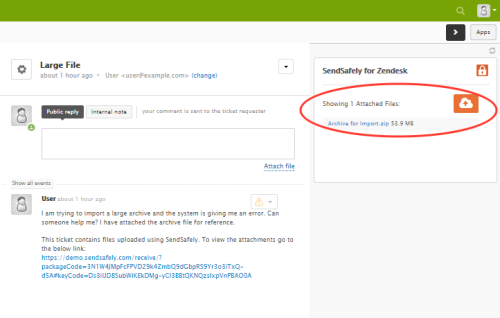
Agents are presented with a unified view of all files attached to the ticket they are viewing. Agents can also easily attach new files to a ticket comment when responding by pressing the orange upload icon from within the app.
Interested in trying out the app for your self? Get it now from the Zendesk Marketplace or Contact Us for a demo!


