Skip to content
New AI Custom Form BuilderDescribe the intake form. It ships branded and end-to-end encrypted.AI Custom Form Builder is here See it build
Integrations

Blocking Un-Encrypted Attachments in Zendesk

Customer facing support teams are often the busiest employees in an organization, striving to provide the best customer service in the least amount of time.

Brian Holyfield · 2 min read
Blocking Un-Encrypted Attachments in Zendesk

Customer facing support teams are often the busiest employees in an organization, striving to provide the best customer service in the least amount of time. As a result, instead of protecting sensitive files with SendSafely agents may accidentally attach unencrypted documents to a ticket as a native Zendesk attachment (using the paper clip icon, which cannot be disabled).

To guide agents to use SendSafely, our latest SendSafely Zendesk app now gives you the option to block the submission of tickets with unencrypted attachments. Agents have a lot to keep track of, with this new setting they no longer have to worry about accidentally using the wrong attachment option.

The new setting is an option under App Settings. By default this option is disabled.
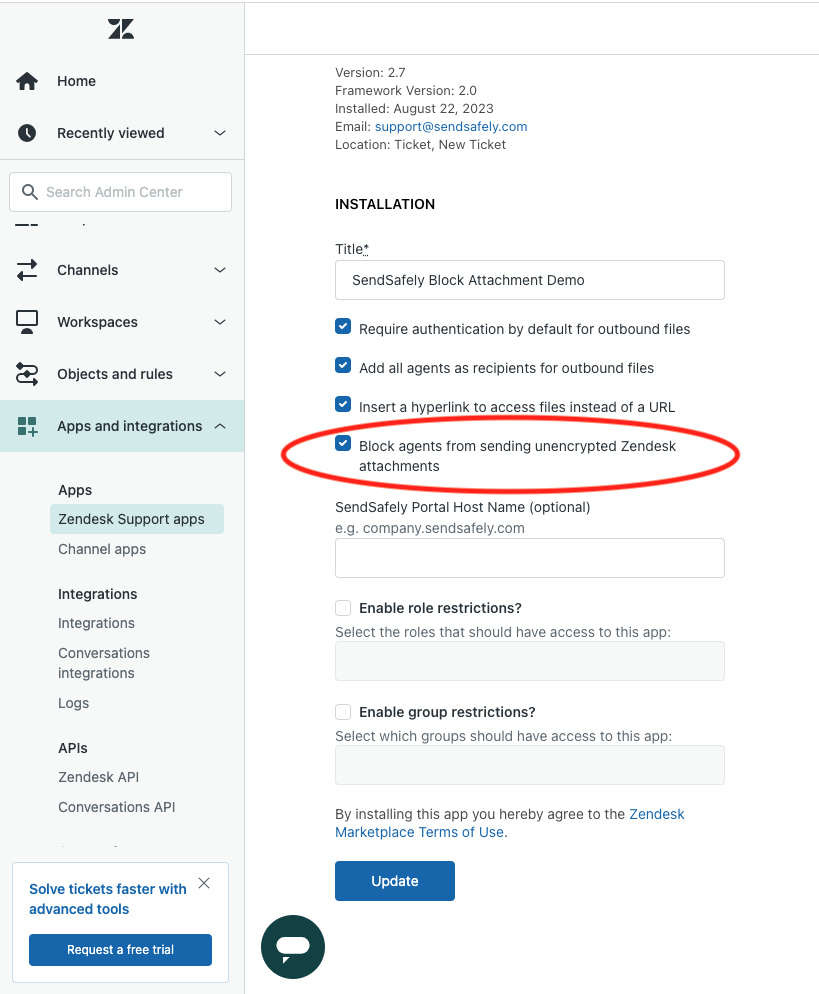
Optional Setting Block Attachments

Once enabled, agents will receive a warning message any time files are attached using the paper clip in the ticket editor. Agents are guided to remove the attachment and use SendSafely instead. The agent is unable to submit the ticket until the unencrypted attachment is removed.
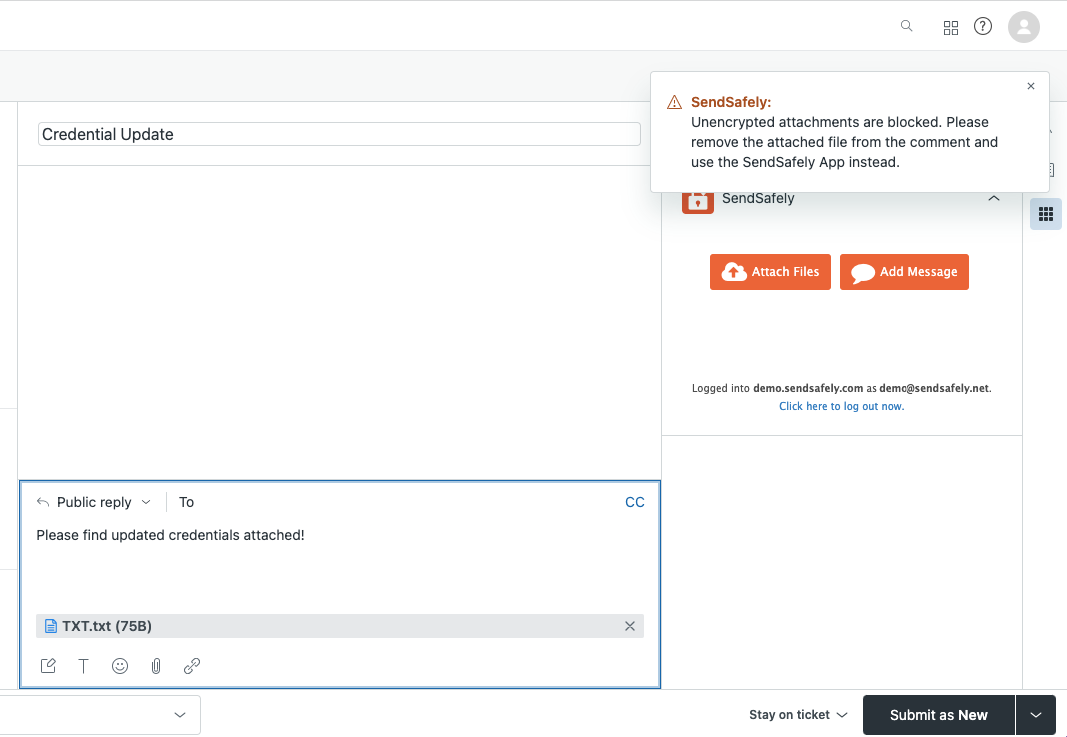
Blocked attachments message v2

More information on this feature along with a complete overview of the SendSafely Zendesk Agent App can be found in our Online Help Center.


SendSafely: Integrated File Transfer for the Apps you Love

_If you are looking for a secure way to transfer files with customers or business partners, our platform might be right for you. Contact us today to request a demo and free trial subscription. _

Request a Demo

Frequently asked questions

Can I stop Zendesk agents from attaching unencrypted files to tickets?

Yes. The SendSafely Zendesk app has a setting that blocks ticket submission when an unencrypted attachment is added with the native paper clip. The agent sees a warning and cannot submit until the attachment is removed and SendSafely is used instead. See the Zendesk integration.

Why do support agents end up attaching unencrypted files in Zendesk?

Busy agents may accidentally use the native Zendesk paper clip attachment instead of SendSafely, and the paper clip option cannot be disabled in Zendesk. The SendSafely setting guides agents back to the encrypted option.

How do I turn on blocking of unencrypted attachments in the SendSafely Zendesk app?

Enable the blocking option under App Settings in the SendSafely Zendesk app. It is disabled by default, so admins need to turn it on before agents are prevented from submitting tickets with native, unencrypted attachments.

What happens when an agent attaches a file with the Zendesk paper clip after blocking is enabled?

The agent receives a warning message guiding them to remove the attachment and use SendSafely instead. The ticket cannot be submitted until the unencrypted attachment is removed.

Written by Brian Holyfield