
Modern browsers are increasingly focused on user privacy — and one area seeing major changes is third-party cookie (3PC) handling. This affects many apps that operate inside iFrames, including our own SendSafely Zendesk Agent App. We’re excited to share a new enhancement that ensures our app continues to work seamlessly, even when third-party cookies are blocked.
What’s Changing with Browsers?
Each browser handles third-party cookies in different ways:
-
Safari blocks 3PCs by default.
-
Chrome, Firefox, and Edge block 3PCs in incognito/private modes, with full default blocking on the horizon.
-
All major browsers allow users to manually toggle 3PC settings.
Since the SendSafely Zendesk Agent App runs in an iFrame, cookies used for key functionality (like session tracking and authentication) are classified as third-party by the browser. Previously, when these cookies were blocked by the browser, agents were unable to use the SendSafely agent app.
Solution: The Storage Access API
To maintain a seamless experience, we’ve implemented a new fallback mechanism using the Storage Access API — a browser-native standard specifically designed to replace third-party cookies in privacy-conscious environments. Where available, the API provides a secure, consent-based mechanism for data access between SendSafely and Zendesk.
####
How It Works:
-
If 3PCs are allowed, the app continues to use them (no change)
-
If 3PCs are blocked, and the browser supports the Storage Access API, our app will prompt the user once for permission to access the API.
- This one-time consent allows our app to function normally without relying on traditional cookies.
- This update works across all major browsers supported by our Zendesk Agent App: Chrome, Firefox, Edge and Safari
####
User Experience: What Agents Will See
On the first session where 3PCs are blocked:
- The agent will see a SendSafely in-app prompt:
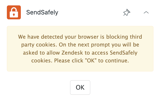
- After clicking OK, the browser will display a one-time prompt asking if you wish to allow SendSafely to share information with Zendesk. Once access is granted, the prompt won’t appear again for future sessions.
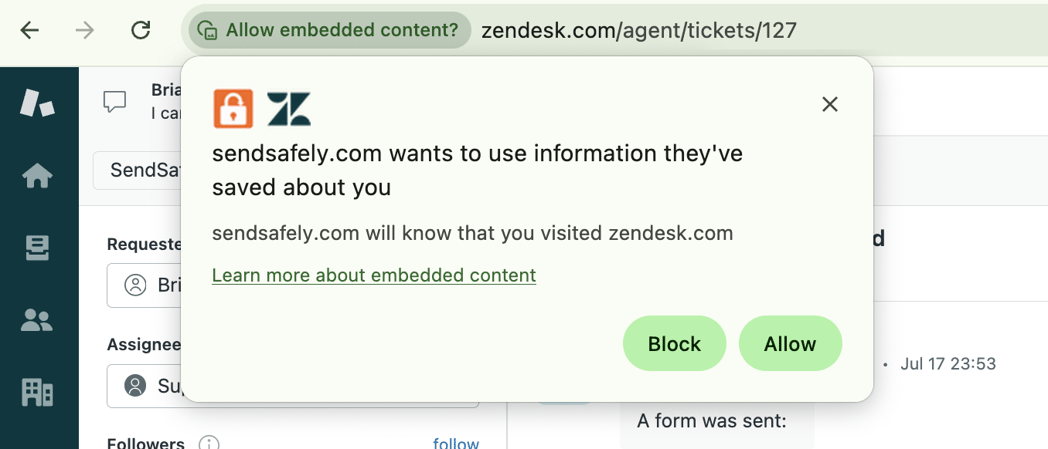
⚠️ NOTE: The Storage Access API prompts vary slightly by browser, but all clearly indicate that SendSafely is requesting cross-site access to function properly.
Here at SendSafely, we are committed to keeping your Zendesk workflows secure and ready for the evolving privacy landscape. If you have any questions or feedback on this update, please reach out to support@sendsafely.com.
SendSafely: Encrypted File Transfer for Modern Business
If your organization needs a secure way to transfer files with customers or business partners, our platform might be right for you. Contact us today.
Request a Demo


