Organizations large and small are in constant need of tools that not only protect sensitive information but also integrate seamlessly into their existing workflows. Enter SendSafely Actions, an innovative feature designed to effortlessly automate and integrate secure data exchange into common business processes.
Actions represent a leap forward in SendSafely’s integration and automation capabilities, extending the already robust SendSafely API. With Actions, you don’t need to be a developer to build end-to-end encryption into your workflows.
What are SendSafely Actions?
Actions are a low-code/no-code workflow framework for automating processes triggered by events occurring in SendSafely. Automated workflows can execute internally within SendSafely (native actions) or occur externally and process outside of the SendSafely platform (external actions). Examples of external actions are functions performed by third party platforms such as anti-virus scanning, data loss prevention or document archival. Customers can create their own actions or use templates published by SendSafely. And since external actions typically run within your own cloud environment (outside of SendSafely) they can safely decrypt sensitive files while allowing you to maintain full control over how the decrypted data is handled.
Real-World Use Cases
The possibilities for automation and integration are endless, but a few popular use cases are listed below:
- Anti-Virus Scanning - Scan all inbound files with your organization’s AV solution and delete quarantined files if a threat is found.
- Data Loss Prevention - Scan all outbound files with your organization’s DLP solution so that files containing restricted content can be blocked from access.
- Document Archival - Archive a copy of every file sent through your SendSafely portal for compliance purposes.
- ID Scanning and File Renaming - Scan uploaded identification documents and rename each file with a self describing name and/or unique Identifier.
- Document Analysis - Analyze the content of documentation uploaded to a SendSafely Dropzone and route a copy to the appropriate SendSafely Workspace.
- Domain Whitelisting/ Blacklisting - Cross reference recipients to an allowed domain list or block transfers to certain domains, like free-mail providers.
Benefits of SendSafely Actions
Automated Security
SendSafely’s end-to-end encryption ensures your data remains protected throughout every automated process.
Enhanced Efficiency
Time is a valuable commodity. SendSafely Actions streamline repetitive tasks, freeing up team members to concentrate on more strategic initiatives. Automating processes not only saves time but also ensures that these critical tasks are completed accurately every time.
Tailored Customization
No two teams are alike. Actions can be precisely tailored to meet the specific demands of your business. Actions can be configured to support a broad range of use cases.
Seamless Integration
SendSafely Actions are designed to blend into your current ecosystem smoothly. With the ability to integrate with other tools and platforms, Actions can enhance your workflow without disrupting established procedures, making secure collaboration easier than ever.
How does it work?
The SendSafely Actions framework is made up of the following 4 components:
- Workflow
- Events
- Actions
- Filters
Workflow
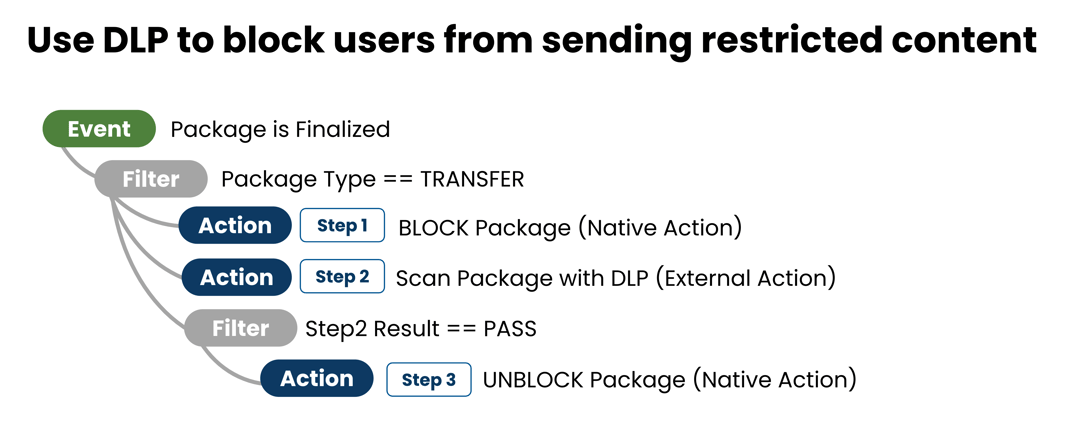
A workflow is an automated process made up of one or more actions triggered by an event. Think of a workflow as a cascading waterfall, the start is a trigger event followed by downstream actions. An example workflow that scans all outbound packages with data loss prevention software is shown below.
Events
An event is a specific activity that sets the whole workflow in motion. We currently support two events, designed to cover all the ways a file can be added to SendSafely (both inbound and outbound). More events are coming soon.
- A Secure Package is finalized (Send Item or Dropzone Upload)
- A file is uploaded to a Workspace
Event filters provide very granular control over when your workflow is triggered. For example, you can filter the secure package finalized event to just Dropzone uploads, or even a specific Dropzone only. Other filters include events triggered by guest users or events occurring in a specific Workspace.
Actions
Actions are the steps, or building blocks that power your workflow. Actions are executed sequentially after the trigger event. You can add filters to each action to limit when they execute. Action filters can also filter upon the results of a previous step in the Workflow. There are two types of actions: Native Actions and External Actions.
Native Actions
Native actions execute internally within SendSafely and are pre-built, SendSafely has taken care of all the coding. Native actions cannot access the content of encrypted files or messages and operate only on file meta-data. We currently support the following Native Actions:
Block / Unblock Files : Blocks all access to the file except for admins and file owners
- Blocked files cannot be accessed by regular users in the UI.
- Use case example: Anti-Virus Scanning.
Hold / Release Files : Prevents deleting or changing a file but allows read/view
- Held files can be viewed or downloaded but cannot be deleted or changed.
- Use case example: preserving original copy until Archiving has occurred.
Delete File : Deletes a File
- Use case example: Automatically deleting a file quarantined by an A/V scan.
External Actions
External actions execute outside of SendSafely, often by a third-party platform like an A/V scanner, DLP analyzer or document archival solution. They are designed to allow access to encrypted content and perform authenticated API calls to other systems. External actions are invoked through an external web hook URL and require their own set of SendSafely credentials for decrypting secure content (API Key + Trusted Device Key). You can create your own external action or use templates published by SendSafely.
Ready to transform your data exchange workflows? Contact the SendSafely team today for a demo and see how SendSafely Actions can streamline your operations while prioritizing security at every step.
SendSafely: Encrypted File Transfer for Modern Business
If your organization needs a secure way to transfer files with customers or business partners, our platform might be right for you. Contact us today.
Request a Demo