
SendSafely Actions just got more flexible. We’ve introduced a new event that triggers when a recipient is added to a transfer package or workspace.
Until now, Actions workflows were triggered by upload events like adding a file to Workspace or submitting a Dropzone or Send package. With this new event, you can now trigger workflow logic based on when a recipient is added to a package, unlocking new workflow possibilities for security and compliance teams.
Why this matters
Many organizations need to enforce policies based on who data is being shared with , not just who sends it. This is especially important for:
- Data Loss Prevention (DLP): Trigger scans or block actions when sensitive files are shared with external recipients
- Information Barriers: Prevent sharing with restricted users, domains, or groups
- Access Governance: Apply controls dynamically as recipients are added to a package
How it works
The new trigger event is automatically available for use from the SendSafely Actions page in the web portal and the API. If working with our API, you can learn more about the event payload, and available filters in our article here. 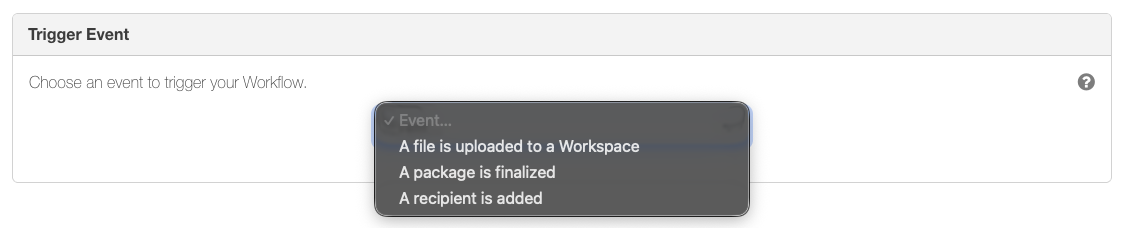
Our new trigger event means you can now build workflows that react in real time as recipients are added, giving you more granular control over how data is shared.
SendSafely Actions is available on our Enterprise plan. Contact the SendSafely team today for a demo and discover how SendSafely Actions can streamline your operations while prioritizing security at every step.
SendSafely: Integrated File Transfer for the Apps you Love
If you are looking for a secure way to transfer files with customers or business partners, our platform might be right for you. Contact us today to request a demo and free trial subscription.
Request a Demo


