SendSafely Workspaces are now archived for 30 days prior to being permanently deleted from the platform. This new feature provides the ability for users to restore an archived Workspace should they need to recover items or reinstate access.
When in the archived state, all access to the Workspace content (files and folders, collaborators and activity) is disabled. The Workspace Owner or an Enterprise Admin, however, can restore the Workspace back to an active state if necessary.
A summary of each Workspace state is below:
- Active : Full functionality and collaborator access enabled.
-
Archived : All functionality and collaborator access disabled. Archived Workspaces are only visible to the Owner of the Workspace, and can be restored to the active state by the Owner or a SendSafely Enterprise Administrator.
- Deleted : Workspace has been permanently deleted and cannot be restored. Workspace metadata and activity log remains available via the SendSafely API but is not visible in the Workspace listing from the portal.
Workspaces can be archived from the Workspaces tab of the History page by clicking the X on the far right of the relevant Workspace listing row.
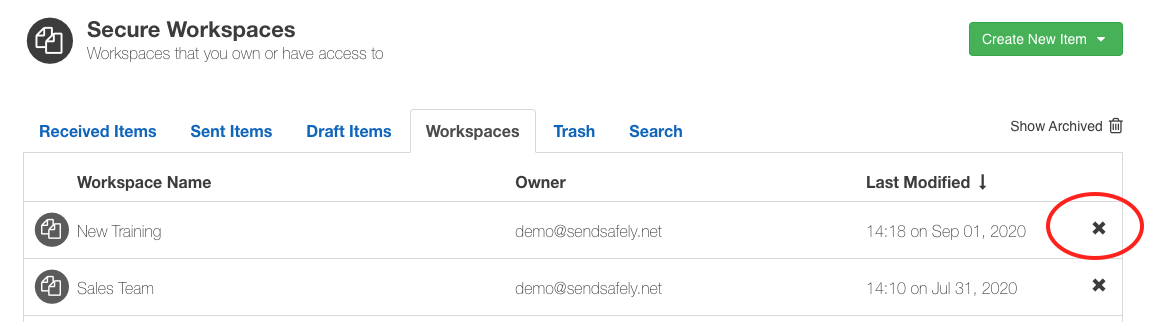
Archived workspaces are hidden by default. You can click the “Show Archived” link in the top right corner of the Workspace listing to enable an expanded view that shows your archived Workspaces.
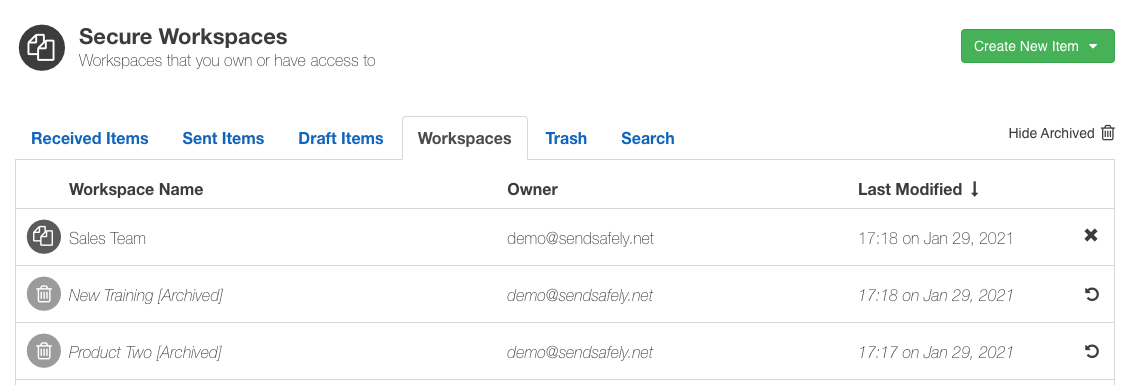
Owners and Admins can restore a Workspace back to the active state by clicking the restore icon (circular arrow) on the far right side of the relevant Workspace listing row.
Workspaces can only be restored up to 30 days after the date that the Workspace was archived. After 30 days, archived Workspaces will be permanently deleted. Once deleted a Workspace cannot be restored.
For more information on Archiving and Restoring Workspaces, consult our Help Center article on this topic.
SendSafely: Encrypted File Transfer for Modern Business
If your organization needs a secure way to transfer files with customers or business partners, our platform might be right for you. Contact us today.
Request a Demo