Skip to content
New AI Custom Form BuilderDescribe the intake form. It ships branded and end-to-end encrypted.AI Custom Form Builder is here See it build
Product

New Report: Security Groups Members

We’ve added a new Enterprise Report that lets administrators view membership across all Security Groups in their SendSafely organization.

Brian Holyfield · 1 min read
New Report: Security Groups Members

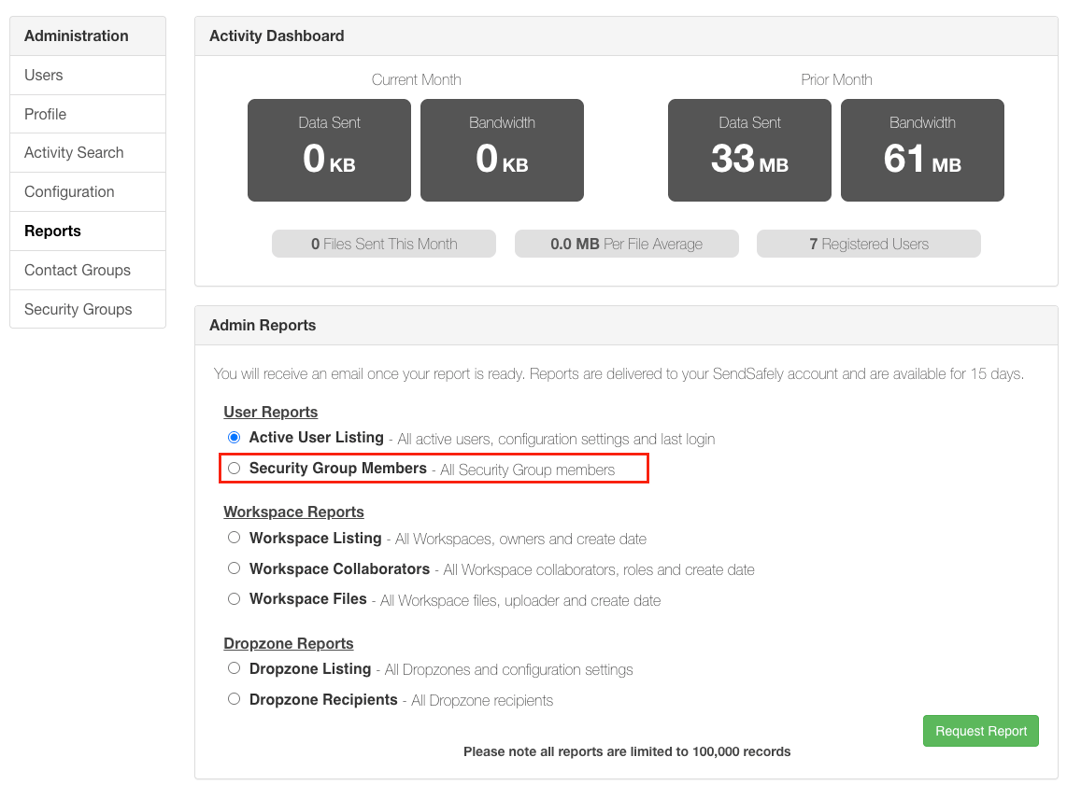
We’ve added a new Enterprise Report that lets administrators view membership across all Security Groups in their SendSafely organization. Whether you’re performing a quarterly access review or responding to a compliance audit, you can now generate a CSV export of Security Group membership with just one click.

The new Security Group Members report is available in the Enterprise Console under Reports → Admin Reports → User Reports. Reports are delivered via SendSafely’s standard secure report delivery as a SendSafely package emailed to the requesting admin.
Reports

The new Security Group Members Report gives administrators a single, centralized view of access permissions. This report is particularly useful for organizations that enforce role-based access or need to regularly review and certify user access for compliance. For more information about Security Groups and Enterprise Reporting, contact your Customer Success Manager.

Security Groups are available on SendSafely Enterprise plans. For more information, contact success@sendsafely.com.


SendSafely: Integrated File Transfer for the Apps you Love

If you are looking for a secure way to send or receive files with anyone, or simply need a better way to transfer large files, our platform might be right for you.

Request a Demo

Frequently asked questions

How do I see which users are in each SendSafely Security Group?

Run the Security Group Members report in the Enterprise Console under Reports, then Admin Reports, then User Reports. It generates a CSV export of membership across all Security Groups in your organization with one click.

How is the SendSafely Security Group Members report delivered?

The report uses SendSafely’s standard secure report delivery: it is sent as a SendSafely package emailed to the admin who requested it.

What is the Security Group Members report used for?

It gives administrators a single, centralized view of access permissions. It is useful for quarterly access reviews, compliance audits, and organizations that enforce role-based access or need to regularly review and certify user access.

Which SendSafely plans include Security Groups?

Security Groups are available on the SendSafely Business and Enterprise plans. For more details on Security Groups and Enterprise Reporting, contact your SendSafely Customer Success Manager.

What permissions can SendSafely Security Groups control?

Security Groups assign permissions to sets of users. For example, in November 2025 SendSafely added a Send Security Group permission that restricts members to inbound-only workflows by disabling outbound file sharing across SendSafely features and integrations.

Written by Brian Holyfield