
Keeping your shared files in Workspaces compliant has never been easier. With our new Workspace File Expiration feature—available on Teams, Business, and Enterprise plans—Workspace Owners and Managers can automatically purge out-of-date content on a rolling schedule, ensuring your workspaces stay lean and your data governance stays rock-solid.
Benefits of Workspace File Expiration
-
Streamlined Cleanup
No more manual audits or deletions. Set expiration once, and old files are deleted automatically—saving time and headache. -
Consistent Governance
Enforce your organization’s retention policies at the workspace level. Files older than your chosen threshold are removed across the board. -
Enhanced Security & Compliance
Minimize risk by ensuring stale or sensitive content isn’t lurking indefinitely. All expiration actions are fully logged in the Workspace Activity log for audit trails.
####
How It Works
- Enable per Workspace
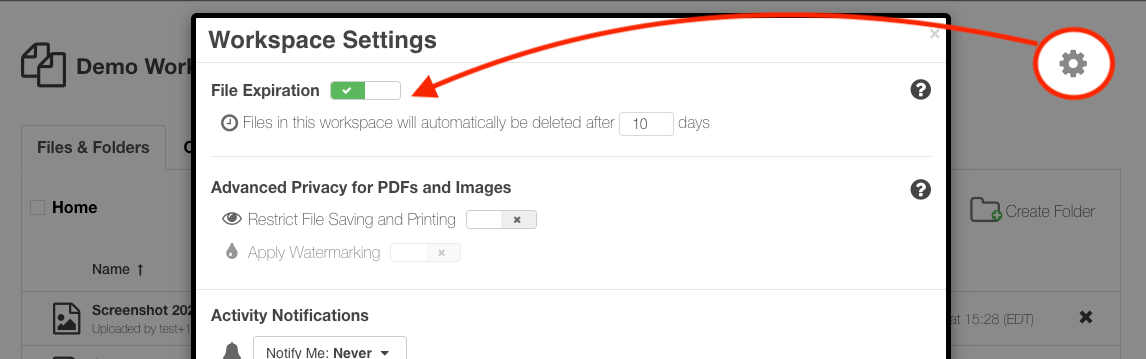
Navigate to Workspace Settings. Workspace Owners and Managers simply toggle on file expiration and choose the retention period (in days). -
Rolling 24-Hour Checks
Every day, on a rolling basis, the system scans for files whose “Added on” timestamp exceeds your chosen limit. -
Version-Aware Deletion
All versions of an expired file are deleted together, based on the date of the most recent update. - Built-In Audit Trail
Enabling, disabling, or changing expiration settings—and every automatic file deletion—is recorded in the Workspace Activity log for full transparency.
####
Ready to Automate Your Cleanup?
Workspace File Expiration puts you in command of your data’s lifespan, boosts security, and simplifies compliance. Enabling it takes just seconds in your Workspace Settings. Start using Workspace File Expiration now and embrace effortless data governance. For more information on how this feature works, consult our Help Center article.
Workspace expiration is available on the SendSafely Teams, Business and Enterprise plans. For more information, contact success@sendsafely.com.
SendSafely: Integrated File Transfer for the Apps you Love
If you are looking for a secure way to send or receive files with anyone, or simply need a better way to transfer large files, our platform might be right for you.
Request a Demo


