Skip to content
New AI Custom Form BuilderDescribe the intake form. It ships branded and end-to-end encrypted.AI Custom Form Builder is here See it build
Product

Contact Groups: Streamlined Access to Frequent Recipients

Do you use SendSafely to send files or messages to the same group of people on a frequent basis?

Brian Holyfield · 2 min read
Contact Groups: Streamlined Access to Frequent Recipients

Do you use SendSafely to send files or messages to the same group of people on a frequent basis? If so then you’ll love our new feature, called**Contact Groups,** that lets you easily manage lists of recipients to streamline the sending process.

You can create a Contact Group for internal teams, external distribution lists, or any other group of people you communicate with regularly. Contact Groups are created and managed in your SendSafely Profile.

You can add your first new Contact Group by following these steps:

  1. Navigate to: Account Menu >Edit Profile.
  2. Give your Contact Group a name and press Add New Group
  3. Enter the email address of your first group member and press Add User

Repeat step 3 for each new member of your group. If you have a large number of users to add, you can paste up to 50 email addresses at a time.
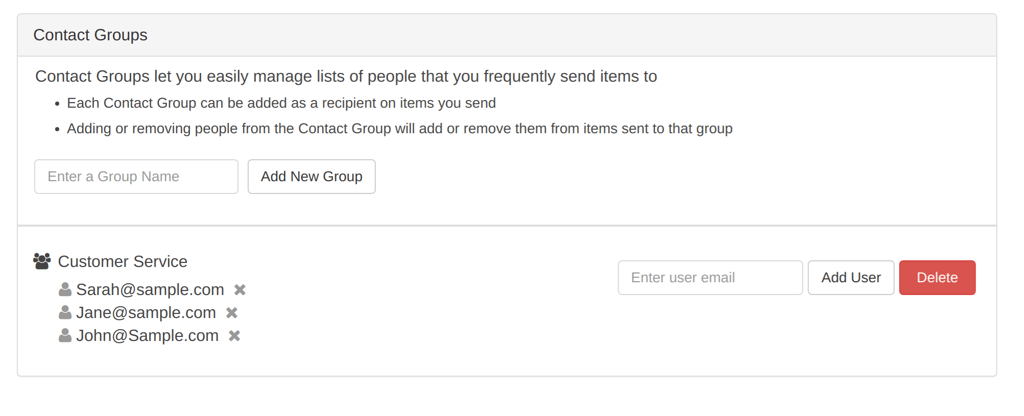
Create Contact Group.png

Once you’ve created the Contact Group, you can add the group as a recipient to any items you send. Just enter the Contact Group name in the Add Recipient field on the Send Items page as shown below (you can also add groups to an existing item from the item’s Status screen).
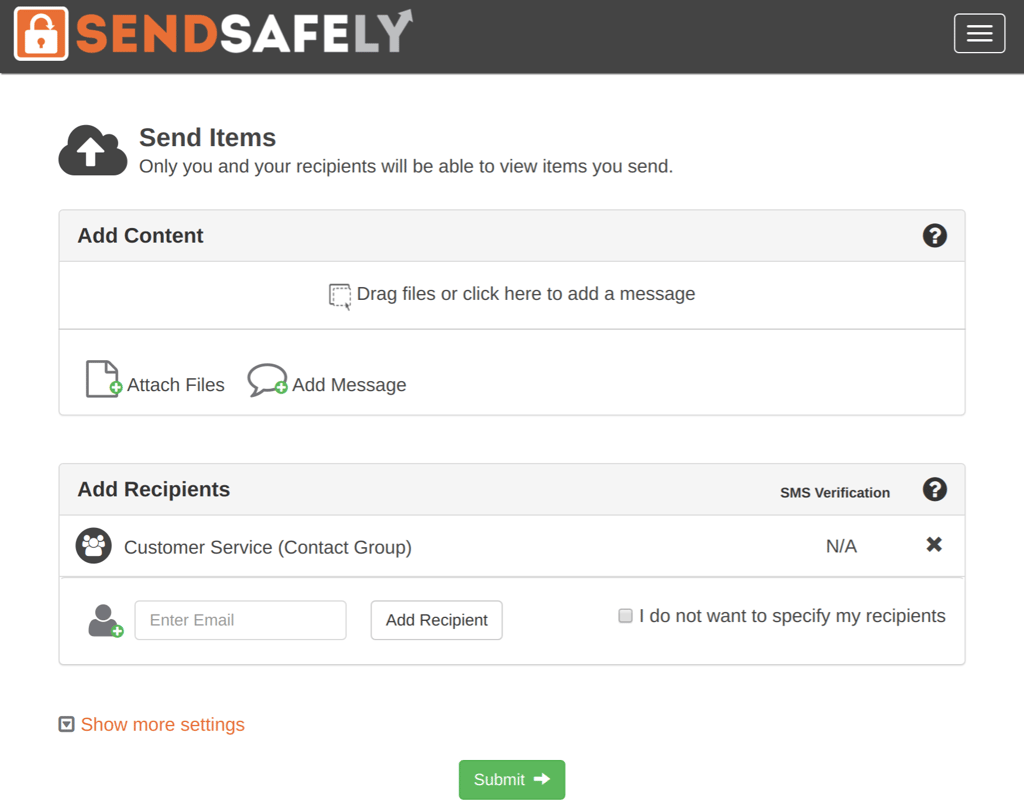
Send Item - Contact Group.png

Enterprise Contact Groups

For SendSafely enterprise customers, Contact Groups can also be defined at the organization level and made available for use by all users within the company. Enterprise Contact Groups can be viewed and managed from the SendSafely Enterprise Console (requires company administrator permissions).

For more information or questions regarding SendSafely Contact Groups, you can email our support team at support@sendsafely.com.

Frequently asked questions

What are SendSafely Contact Groups?

Contact Groups are saved lists of recipients you send files or messages to frequently, such as an internal team or an external distribution list. Adding a group as a recipient adds all of its members at once.

How do I create a Contact Group in SendSafely?

When Contact Groups launched in 2017, you went to Account Menu > Edit Profile, named the group and pressed Add New Group, then entered each member’s email address and pressed Add User. For large groups you could paste up to 50 email addresses at a time.

How do I send an item to a Contact Group?

Type the Contact Group name in the Add Recipient field on the Send Items page. You can also add a group to an item you already sent from that item’s Status screen.

Can administrators create company-wide Contact Groups?

Yes. For Enterprise customers, Contact Groups can be defined at the organization level and made available to all users in the company. They are viewed and managed from the SendSafely Enterprise Console, which requires company administrator permissions.

Written by Brian Holyfield