Skip to content
New AI Custom Form BuilderDescribe the intake form. It ships branded and end-to-end encrypted.AI Custom Form Builder is here See it build
Product

New: Preview All Files in a Package at Once

We have made it faster and more convenient to review multiple files at a time with our new Preview All feature.

Brian Holyfield · 2 min read
New: Preview All Files in a Package at Once

We have made it faster and more convenient to review multiple files at a time with our new Preview All feature. Instead of opening each file one by one, you can now move through every viewable file in a package, quickly and easily.
When you open a file in preview mode, you’ll now see simple navigation arrows that let you flip through all other viewable files in the same package. No extra clicks or closing and reopening, just simple navigation from one file to the next.
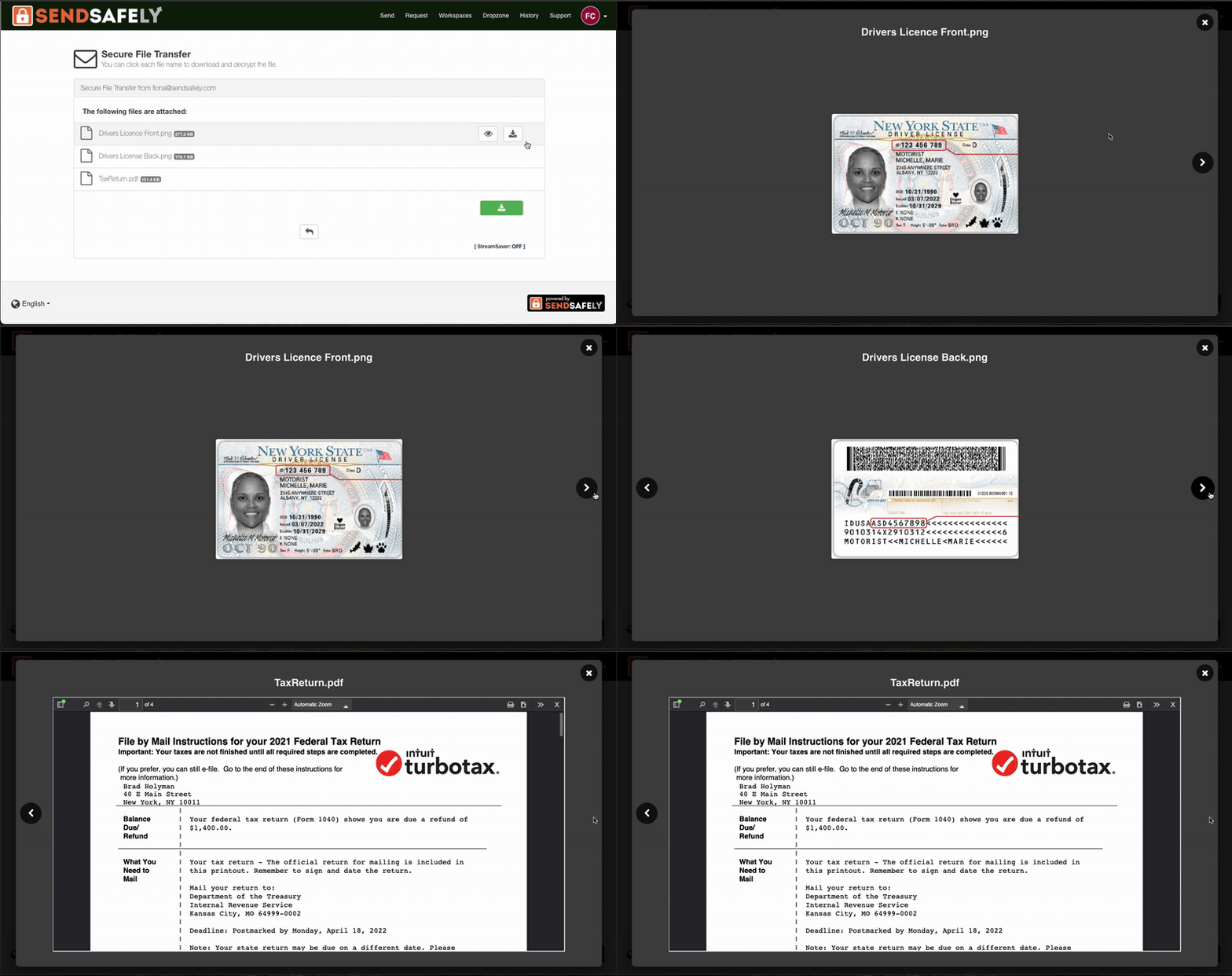
PreviewAll-ezgif.com-video-to-gif-converter

You can use your keyboard’s arrow keys or click the on-screen left and right arrows to move between files.

Preview works for image, PDF and video file types. If you come across a file type that can’t be previewed, such as a spreadsheet or log file, SendSafely will display an option to download it securely instead.

This new feature is currently available in the SendSafely Web Portal, with support for Zendesk and Salesforce agent apps coming soon.


SendSafely Preview All is available on all SendSafely plans. For more information, contact success@sendsafely.com.


SendSafely: Integrated File Transfer for the Apps you Love

If you are looking for a secure way to send or receive files with anyone, or simply need a better way to transfer large files, our platform might be right for you.

Request a Demo

Frequently asked questions

How do I preview multiple files in a SendSafely package without opening each one?

Open any file in preview mode, then use the on-screen left and right arrows or your keyboard’s arrow keys to move through every other viewable file in the same package. You don’t need to close and reopen files between previews.

Which file types can SendSafely preview?

SendSafely’s preview supports image, PDF, and video files. Files that can’t be previewed, such as spreadsheets or log files, display an option to download them securely instead.

What happens when Preview All reaches a file that can't be previewed?

When you navigate to a file type that can’t be previewed, such as a spreadsheet or log file, SendSafely displays an option to download that file securely instead of showing a preview.

Is Preview All available in the SendSafely Zendesk and Salesforce apps?

Yes. Preview All launched in the SendSafely Web Portal in October 2025 and has since expanded to the Zendesk agent app, Workspaces, and the Salesforce agent app.

Which SendSafely plans include Preview All?

Preview All is available on all SendSafely plans. It works in the SendSafely Web Portal for image, PDF, and video files, letting you preview every file in a package at once.

Written by Brian Holyfield