
SCIM, which stands for System for Cross-domain Identity Management, is an open standard that facilitates automated account creation and de-provisioning in applications that use single sign-on. SendSafely is rolling out SCIM support for enterprise customers using SAML based single sign-on (SSO). Native SCIM integration is now available for Okta customers, with support for additional SSO providers coming soon.
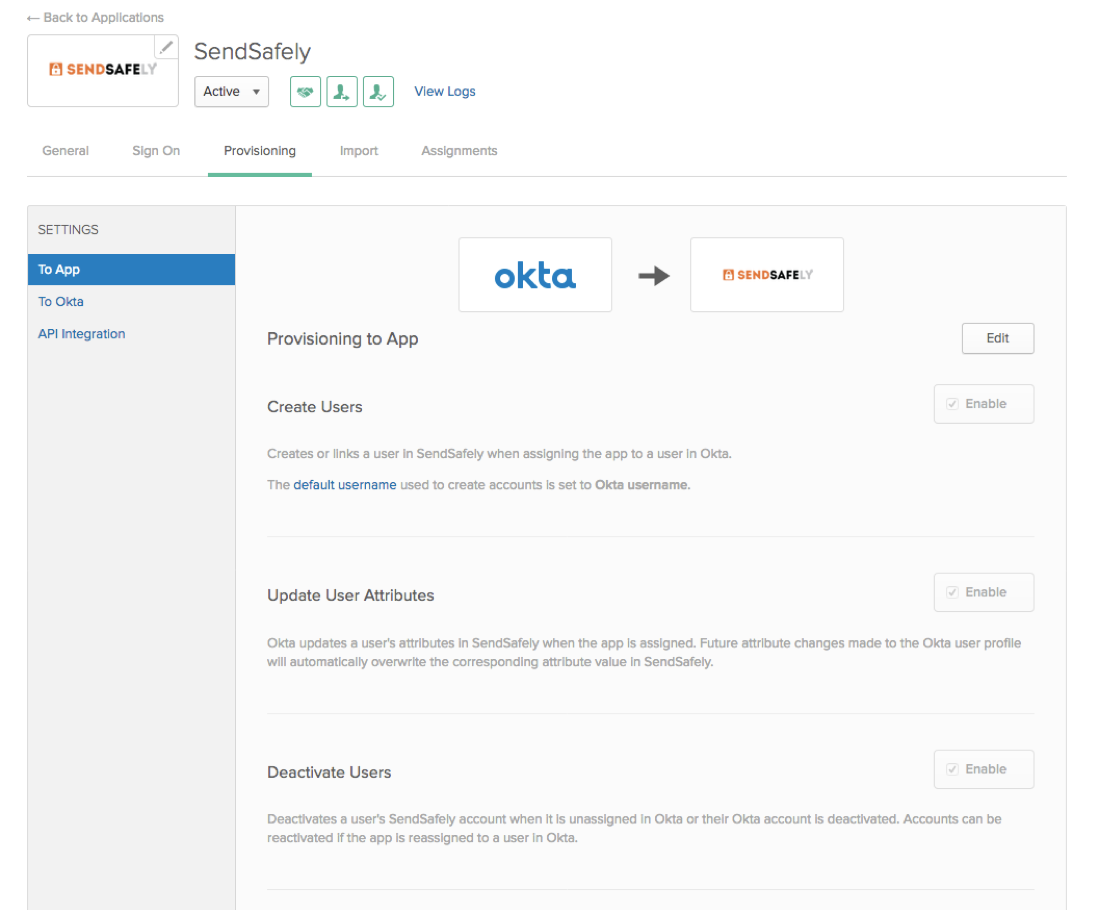
You can enable SCIM for Okta from the Provisioning tab in the Okta admin console. The following provisioning features are supported:
- Create Users - Users assigned to the SendSafely application in Okta will be automatically created and registered in your SendSafely enterprise portal. Once provisioned, users will be able to log into SendSafely by clicking the “Login using Single Sign-on” button on the SendSafely Enterprise portal login page or by clicking the SendSafely application tile from their Okta Home screen.
- Update User Attributes - Updates made to the user’s First Name and Last Name within Okta will automatically be applied to the user’s SendSafely profile.
- Deactivate Users - Deactivating the user or disabling the user’s access to the SendSafely application through Okta will deactivate the user’s account in SendSafely. Deactivating a user results in removal of the SendSafely user’s profile data and deletion of all files and messages from their history.
For more information, refer to our Help Center article that includes step-by-step instructions on how to enable SCIM within Okta. If you are a current customer and have additional questions or need assistance with configuring SCIM, please contact our support team.
SendSafely: Integrated File Transfer for the Apps you Love
If you are looking for a secure way to transfer files with customers or business partners, our platform might be right for you. Contact us today to request a demo and free trial subscription.
Request a Demo


