SendSafely is used by thousands of people all over the world to submit sensitive files every day. In order to better support customers across geographical and language barriers, we are rolling out the first phase of a long-term initiative to enable support for multiple languages across the SendSafely platform. We decided to start with our most frequently used component, the SendSafely Dropzone.
Dropzone users can now choose their preferred language from the dropdown menu located in the top-right corner of the Dropzone dialog as shown below.
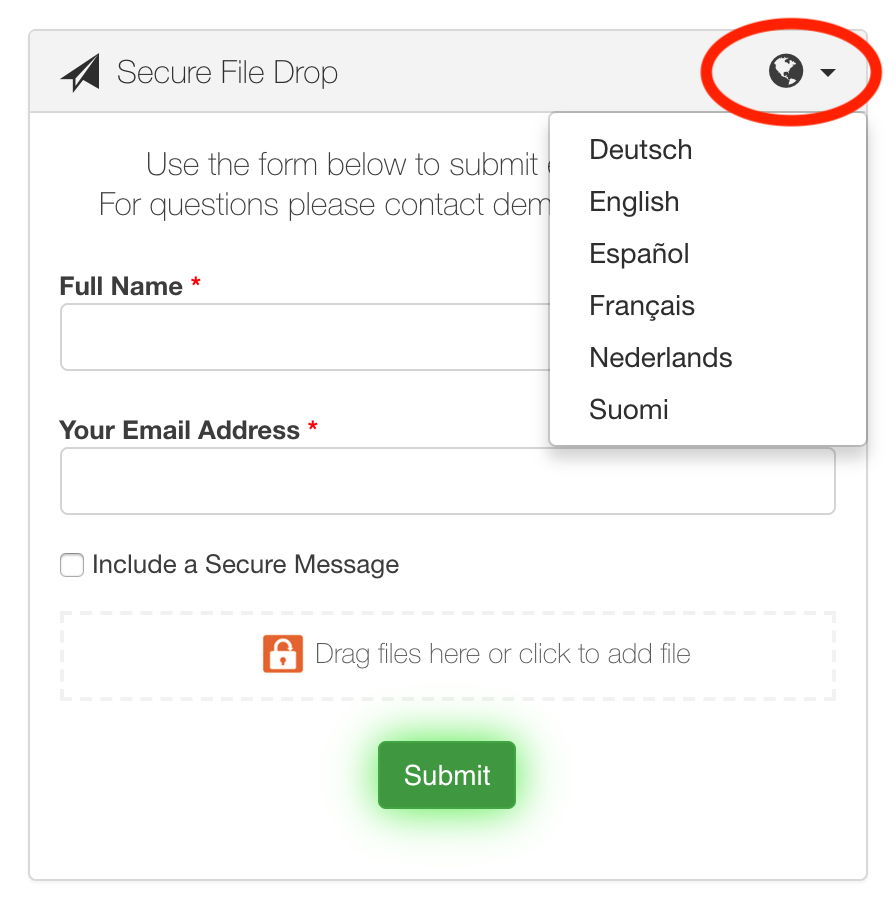
In order to help improve the accuracy of our interface, we’ve opened up the translation process to the community because you know best how SendSafely should be translated into your native language. You can visit our community translation portal to provide us with feedback and help us improve the overall accuracy of the translated content.
Note that if you have chosen to customize your Dropzone Form Input Label , this value will not be automatically translated unless you use the default value (Full Name). Any changes made to this label will be displayed in the language that was used to customize the text.
If you are a current SendSafely customer and would like to request additional languages or screen translations, please send an email to support@sendsafely.com.
SendSafely: Integrated File Transfer for the Apps you Love
_If you are looking for a secure way to transfer files with customers or business partners, our platform might be right for you. Contact us today to request a demo and free trial subscription. _
Request a Demo


