
We wanted to take a few minute to highlight some improvements that we recently made for SendSafely Enterprise customers. Last week, many of our enterprise customers woke up to find a shiny new Enterprise Console, which is the control center that enterprise customers use to manage access, search activity and make updates to their site configuration.
We realize this is a critical component for organizations that use our enterprise platform and are always working to make improvements based on user feedback and suggestions. With that said, we’d like to walk you through the recent enhancements included in the new release.
Activity Usage Monitoring (site-wide and per-user)
One of the longest running feature requests for our Enterprise Console was the capability to monitor detailed data across enterprise accounts. The new Enterprise Console features an Activity Dashboard that provides usage statistics for both the current and previous billing cycles. We now show various enterprise-wide statistics like the amount of cumulative data being sent, total bandwidth used, number of files sent, average files size and the number of active users. The active user listing also shows you statistics on data sent and bandwidth on a per-user basis. Be careful, your head may explode with all the new stats!
**
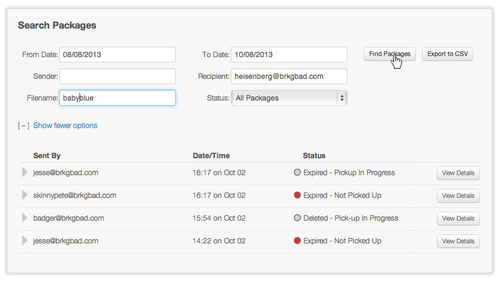
Advanced Search and Export
** We are also happy to announce more flexible and refined search capabilities within the Enterprise Console. Administrators can search any combination of date, sender, recipient, filename and package status to view activity across their organization. We’ve also added the ability to export search results into a CSV (comma-separated value) format for use as you see fit. Your SIEM team is going to love us for this one.
**Registration Restrictions and Custom Branding
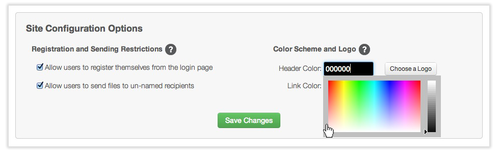
** Last but not least, SendSafely Enterprise customers now have more control with the option to disable support for undisclosed recipients and the ability to restrict registration to only pre-authorized users. We also took the opportunity to revamp the interface in which administrators use to configure custom branding for their enterprise site. You can now upload your own logo and choosing your own color scheme…but be careful, and don’t upset your marketing team!
As always, we welcome feedback on these changes and improvements. If you, or someone you might know, are interested in an Enterprise Account, please reach out to us directly at info@sendsafely.com. We’d love to hear about your secure file transfer needs and tell you how we can help!


