Today, we’re extending SendSafely Halo t o the ServiceNow Virtual Agent - because some workflows require sensitive data that does not belong in a chatbot conversation or a ServiceNow attachment.
Halo gives organizations a secure way to collect sensitive files directly within a Virtual Agent conversation while keeping the file contents out of ServiceNow. Users can upload documents without leaving the conversation, Virtual Agent can continue the workflow as normal, and any resulting case includes everything an assigned agent needs to securely access the files.
Keep the conversation in ServiceNow — and the sensitive files out
Ask someone for a sensitive document mid-conversation and you have two options today. Push them out of the chat to secure email or a portal upload, which breaks the session and usually costs you the deflection. Or you can accept the document as a native ServiceNow attachment, which means the sensitive file becomes part of your ServiceNow instance and is subject to its access controls, retention settings, and broader security boundary.
Halo provides another option.
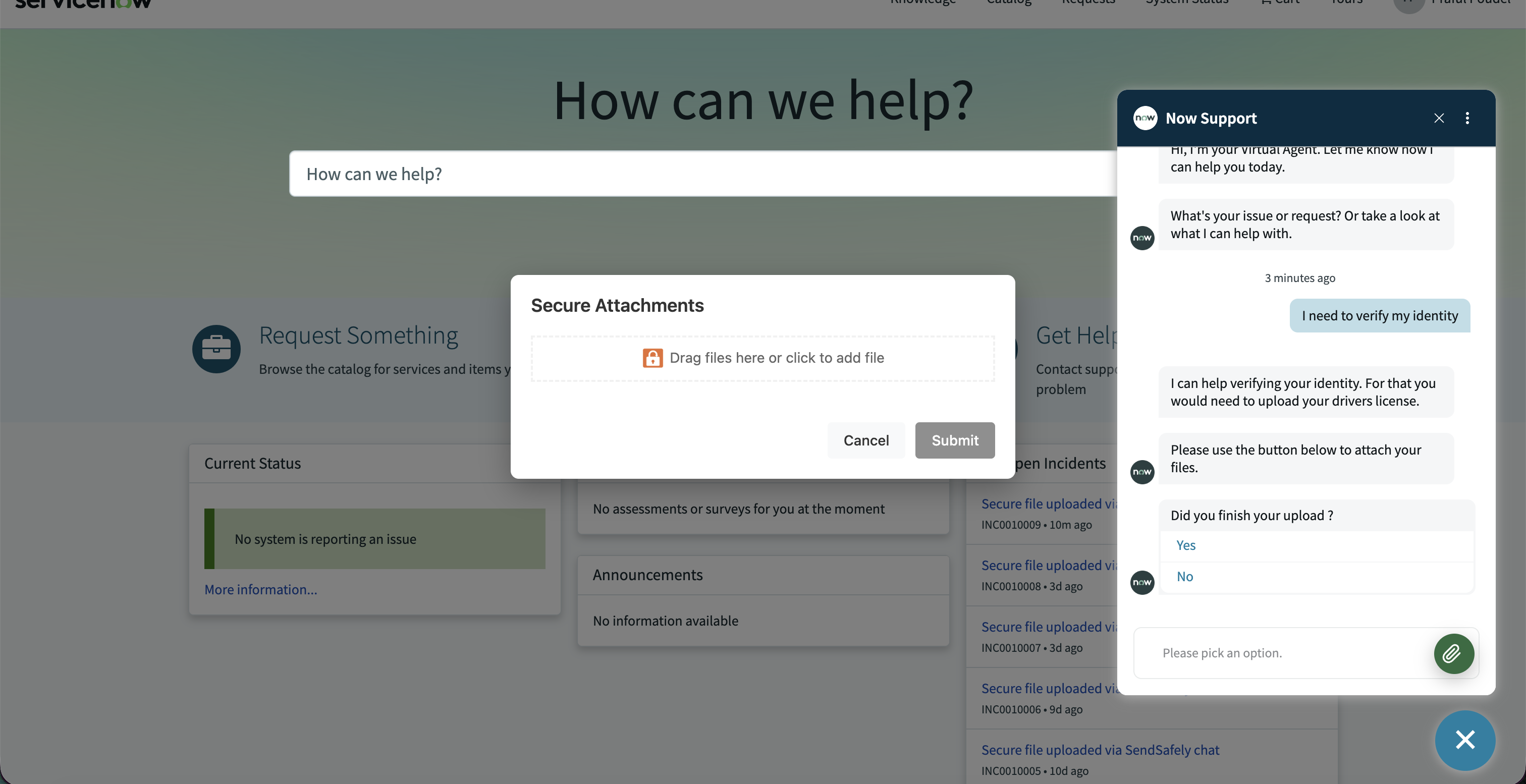
When a Virtual Agent topic needs to collect a sensitive document, Halo presents a secure upload experience directly inside the conversation. The user stays in the same workflow, but the file itself is handled by SendSafely rather than stored as a ServiceNow attachment.
How Halo for ServiceNow works
- The Virtual Agent asks for the file. You configure the topic the way you already do. When the flow reaches a point that needs a document, it triggers Halo instead of a native file upload.
- The upload happens in the chat window. Halo opens a secure modal inside the existing conversation. No new tab, no emailed link, no context switch for the end user.
- Encryption happens on the end user's device. Files are encrypted in the browser before upload. ServiceNow never receives the file bytes, and the Virtual Agent is not on the package recipient list, so the AI has no path to the content collected.
- A secure link goes back into the conversation. Halo posts a SendSafely package link into the chat thread, which carries through into the case record when the conversation creates one.
- The human who picks up the case retrieves the file. Access is governed by SendSafely, centrally, with the same controls, audit trail, and expiration policies you use everywhere else on the platform.
Designed for sensitive AI-assisted workflows
As organizations introduce more AI-assisted experiences into customer and employee workflows, it becomes increasingly important to control what sensitive information those systems can access.
Halo separates the orchestration of the workflow from the contents of the sensitive document.
- Sensitive files stay out of the ServiceNow instance, so they are outside the scope of instance-level ACL mistakes and platform CVEs.
- End users never leave the conversation to submit a document, which keeps Virtual Agent deflection rates intact.
- The AI agent orchestrates the collection without being able to read what it collected.
- Files carry into the case with full conversation context, so the assignee is not reconstructing a thread from a second channel.
- Retention and expiration are handled by SendSafely policy rather than the ServiceNow attachment lifecycle.
As conversational and AI-assisted workflows become a larger part of ServiceNow, sensitive information does not need to become a larger part of the ServiceNow data footprint. Halo shrinks the blast radius by keeping the workflow in ServiceNow and the sensitive content out of it.
Availability
SendSafely Halo for ServiceNow is now available as an add-on for Enterprise plans. Setup instructions are in the Help Center. Existing customers can reach out to success@sendsafely.com. If you are new to SendSafely, please email sales@sendsafely.com to schedule a demo.
SendSafely: Encrypted File Transfer for Modern Business
If your organization needs a secure way to transfer files with customers or business partners, our platform might be right for you. Contact us today.