Being remote is the new normal. Whether you are a customer or an employee, the need to physically visit an office location has been virtually eliminated from most workflows. Being remote can present a significant challenge for businesses that have historically relied on customers visiting their offices in person to complete and submit application forms.
The SendSafely Hosted Dropzone offers a simple way to modernize in person workflows by allowing customers to submit completed application forms easily and securely. With no technical setup or coding required, your processing team can be up and running in minutes.
How it Works
The Hosted Dropzone is a turn-key file drop customers can use to submit completed application forms via any web browser. All submitted files are protected using SendSafely’s end-to-end encryption to ensure maximum privacy and confidentiality.
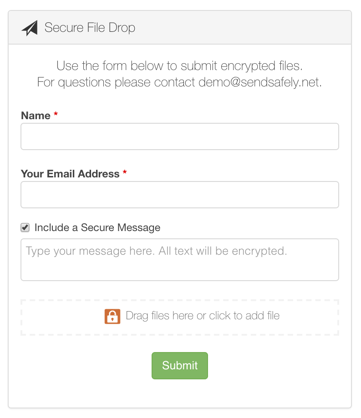 When loaded on a mobile device, the Dropzone even allows users to snap a live photo using their device camera. This makes the Dropzone a perfect option for collecting images of hard copy documents, or cases requiring identify verification such as pictures of Passports or Drivers Licenses.
After each submission, the SendSafely platform alerts the processing team that new files are available. Submitted files can only be viewed by team members who are explicitly granted access to the Dropzone. You can also create multiple Dropzones, one for each different use case and ensure files are only accessible to the relevant processing teams. The Dropzone interface also supports multiple languages for International users.
Example Workflow
The following workflow is extremely popular among SendSafely subscribers and their customers:
- Blank application forms are sent to a customer via regular email or are made available for download from your website.
- Instructions for filling out the application include steps for the secure submission of the completed form to the SendSafely Dropzone. The Dropzone URL looks like this: https://[yourcompany].sendsafely.com/dropzone/onboarding
- After completing the application forms (either electronically or by hand after printing them out) customers browse to the Dropzone URL using the web browser on their mobile device or laptop.
- Customers upload electronic copies of the completed application, or take pictures of the printed forms and supporting documents. The files are submitted to your internal team for processing.
- Internal team members are automatically notified that a new submission has been made. The team securely accesses and begins processing the files.
SendSafely: Encrypted File Transfer for Modern Business
If your organization needs a secure way to transfer files with customers or business partners, our platform might be right for you. Contact us today.
Request a Demo


