Skip to content
New AI Custom Form BuilderDescribe the intake form. It ships branded and end-to-end encrypted.AI Custom Form Builder is here See it build
Integrations

Inline Preview for PDFs and Images on Zendesk

Brian Holyfield · · 1 min read

Our popular Zendesk Sidebar App now allows agents to preview PDFs and most images directly from the Zendesk console without having to locally save the file.

To preview a PDF or image file, agents can click on the file name within the SendSafely Sidebar App. The image or PDF is automatically rendered in a file viewer modal window. Files can still be saved locally by pressing the download button within the viewer.

File preview is available for PDF files and popular image formats (pdf, .png, .gif, .jpg, .jpeg, and .bmp). Zendesk Preview-1
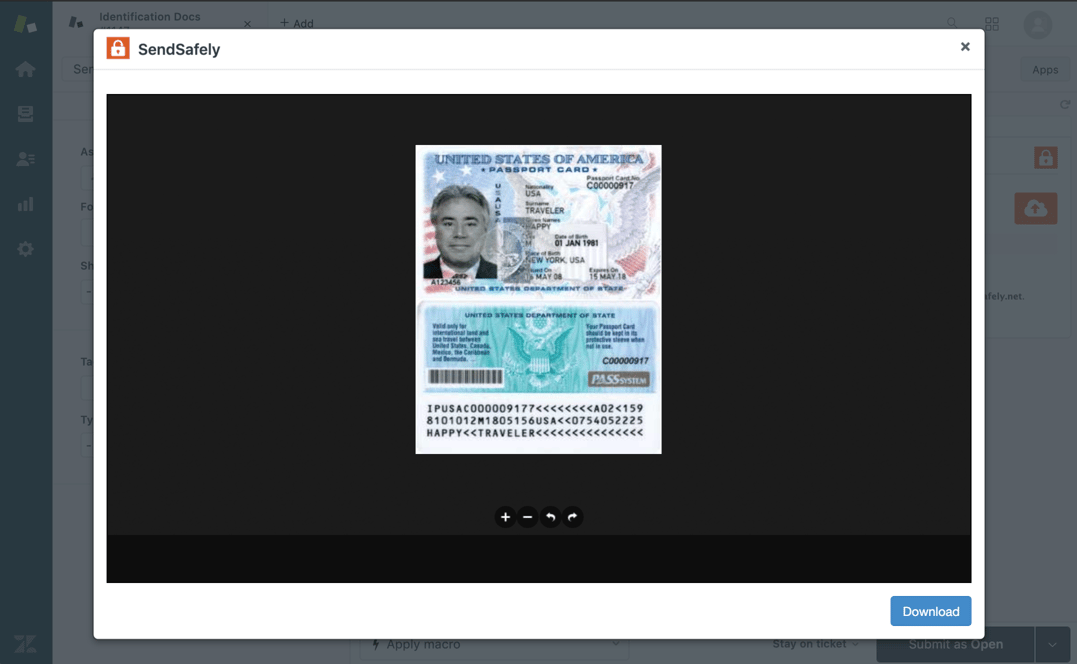
An overview of our Zendesk integration along with instructions on how to install and setup each component can be found in ourOnline Help Center.


SendSafely: Integrated File Transfer for the Apps you Love

If you are a Zendesk customer looking for a secure way to transfer files with customers or need to send large attachments with Zendesk, our platform might be right for you.

Request a Demo

Frequently asked questions

Can Zendesk agents preview SendSafely attachments without downloading them?

Yes. Since 2020, the SendSafely Zendesk Sidebar App lets agents preview PDFs and common image files directly in the Zendesk console without saving the file locally.

How do I preview a file in the SendSafely Zendesk app?

Click the file name in the SendSafely Sidebar App. The PDF or image is rendered automatically in a file viewer modal window.

Which file types can be previewed in the SendSafely Zendesk app?

Preview is available for PDF files and popular image formats: .pdf, .png, .gif, .jpg, .jpeg and .bmp. Agents open a preview by clicking the file name in the SendSafely Sidebar App.

Can agents still download files from the Zendesk preview window?

Yes, in the 2020 release files could still be saved by pressing the download button in the viewer. Dropzones can separately be set to view-only mode to block download, save and print.