Skip to content
New AI Custom Form BuilderDescribe the intake form. It ships branded and end-to-end encrypted.AI Custom Form Builder is here See it build
Integrations

SendSafely Zendesk App Now Supports Dark Mode

Brian Holyfield · · 1 min read

Our latest update makes working in Zendesk just a little easier on the eyes. The SendSafely Zendesk Agent App now supports Dark Mode!

If you prefer Zendesk’s darker display option the SendSafely app will now automatically adapt. When your Zendesk profile display is set to Dark Mode (Profile → Display → Dark mode), the SendSafely app will now match your theme.
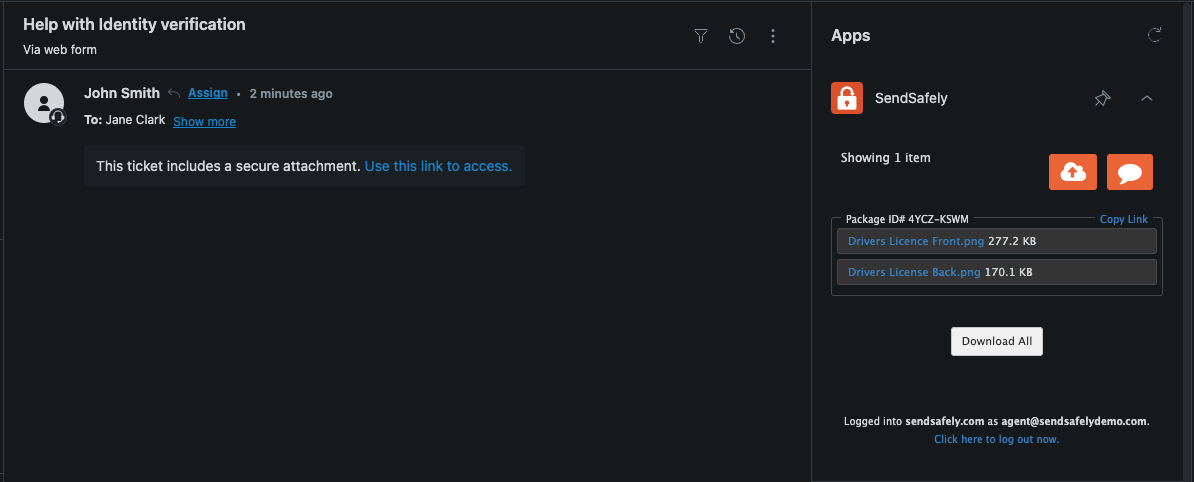
Zendesk Dark Mode

SendSafely for Zendesk is available on SendSafely Enterprise and Business plans. For more information, contact success@sendsafely.com.


SendSafely: Integrated File Transfer for the Apps you Love

If you are looking for a secure way to send or receive files with anyone, or simply need a better way to transfer large files, our platform might be right for you.

Request a Demo

Frequently asked questions

Does the SendSafely Zendesk app support dark mode?

Yes. Since October 2025, the SendSafely Zendesk Agent App supports Dark Mode and automatically adapts to match Zendesk’s darker display option.

How do I turn on dark mode for the SendSafely app in Zendesk?

Set your Zendesk profile display to Dark Mode under Profile, then Display, then Dark mode. The SendSafely app detects the setting and matches your theme automatically.

Do I need to change a setting inside SendSafely to use dark mode in Zendesk?

No. There is no separate SendSafely setting. The SendSafely Zendesk Agent App follows your Zendesk profile display setting and switches to Dark Mode automatically when Zendesk does.