Many users have asked for the ability to suppress the package download notifications that SendSafely emails when items you send are downloaded. In order to address this, we recently added the ability for users to opt-out of these notification emails by updating their SendSafely profile.
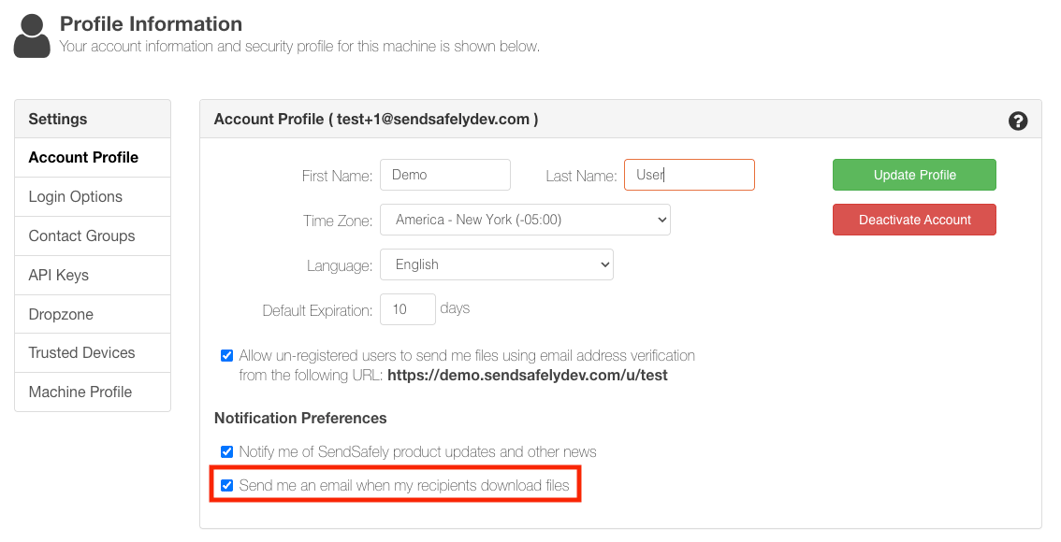
From the Edit Profile page, users will now see a checkbox under the Notification Preferences section on the Account Profile tab.
- Send me an email when my recipients download files. By default, SendSafely will notify you each time a recipient downloads all files in a package for the first time. So, if there are three recipients on a package, you would receive three emails (assuming all recipients downloaded all files). You can now un-check this box if you do not want to be notified when your recipients have downloaded the items you sent them.
For more information or questions regarding this or any other SendSafely feature, you can email our support team at support@sendsafely.com.