Skip to content
New AI Custom Form BuilderDescribe the intake form. It ships branded and end-to-end encrypted.AI Custom Form Builder is here See it build
Engineering

Using a Custom Domain for Email Notifications

Brian Holyfield · · 1 min read

Business and Enterprise customers can now utilize their own email domain for delivery of SendSafely notification emails. This option improves the overall brand experience for guest recipients and results in higher email deliverability for end users with strict firewall or email filter settings.

By default, all SendSafely notification emails, including new item alerts, pick up notices and pin code messages are sent from notifications@sendsafely.com. This new option allows these email messages to be sent from an address within your own email domain instead (ie. transfer@company.com).
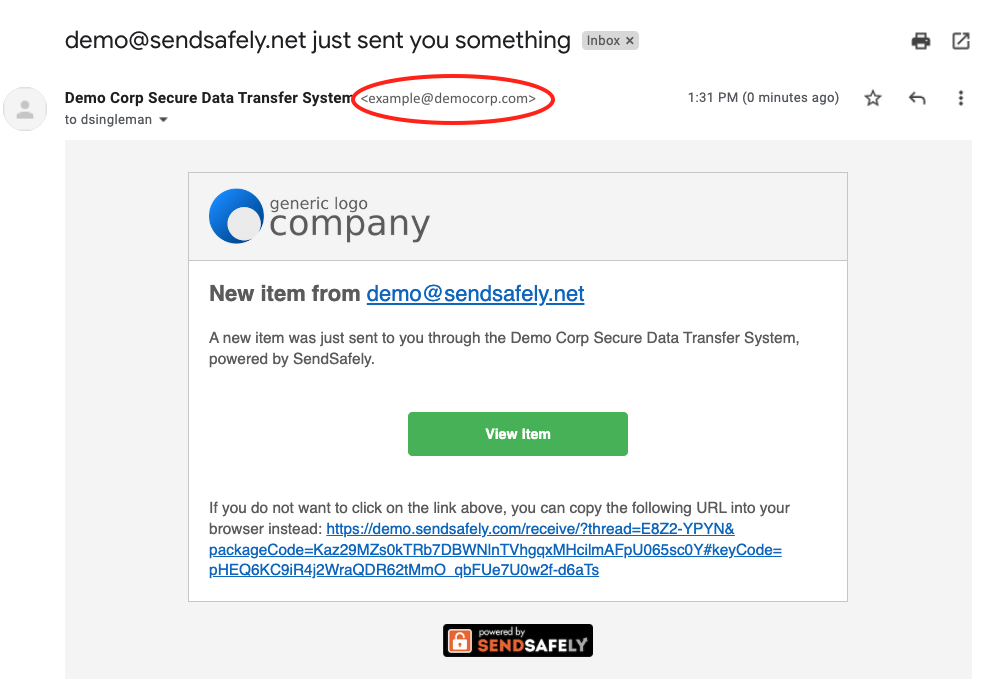
Email Notification Customization

For more detailed information on how to configure Custom Domain Email Delivery , visit our Online Help Center. Contact sales@sendsafely.com for more information on this new feature and SendSafely plans.


SendSafely: Encrypted File Transfer for Modern Business

If your organization needs a secure way to transfer files with customers or business partners, our platform might be right for you. Contact us today.

Request a Demo

Frequently asked questions

Can SendSafely send notification emails from my company's domain?

Yes. Since 2022, Business and Enterprise customers have been able to have SendSafely notification emails sent from an address in their own domain, such as transfer@company.com, instead of notifications@sendsafely.com.

Which SendSafely emails use the custom notification domain?

The custom domain applies to SendSafely notification emails, including new item alerts, pick up notices, and pin code messages. Without it, these are all sent from notifications@sendsafely.com.

How do I set up custom domain email delivery in SendSafely?

Configuration steps for Custom Domain Email Delivery are in SendSafely’s Online Help Center. For more information on the feature and which plans include it, contact sales@sendsafely.com.